FCSS_LED_AR-7.6 Fortinet NSE 6 - LAN Edge 7.6 Architect Questions and Answers
Refer to the exhibit.
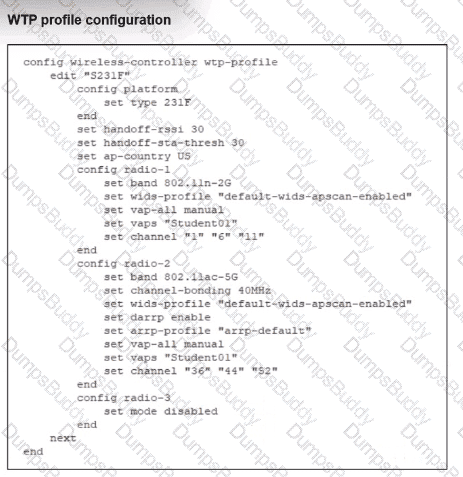
Which shows the WTP profile configuration.
The AP profile is assigned to two FAP-231F APs that are installed in an open plan area.
The first AP has 32 clients associated with the 5 GHz radios and 22 clients associated with the 2.4 GHz radio. The second AP has 12 clients associated with the 5 GHz radios and 20 clients associated with the 2.4 GHz radio.
A dual-band-capable client enters the area near the first AP and the first AP measures the new client at - 3 3 dBm signal strength. The second AP measures the new client at -43 dBm signal strength.
If the new client attempts to conned to the student 01 wireless network, which AP radio will the client be associated with?
A FortiSwitch is not appearing in the FortiGate management interface after being connected via FortiLink. What could be a first troubleshooting step?
A conference center wireless network provides guest access through a captive portal, allowing unregistered users to self-register and connect to the network. The IT team has been tasked with updating the existing configuration to enforce captive portal authentication over a secure HTTPS connection. Which two steps should the administrator take to implement this change? (Choose two.)
A network administrator connects a new FortiGate to the network, allowing it to automatically discover andI register with FortiManager.
What occurs after FortiGate retrieves the FortiManager address?
Refer to the exhibits.
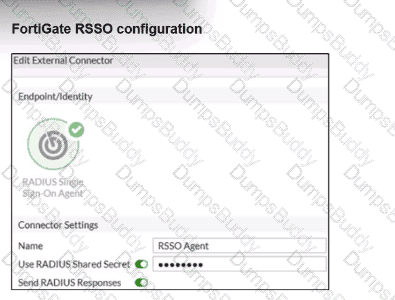
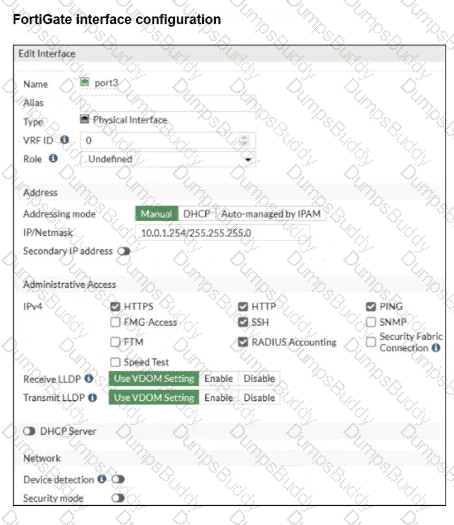
Examine the FortiGate RSSO configuration shown in the exhibit.
FortiGate is set up to use RSSO for user authentication. It is currently receiving RADIUS accounting messages through port3. The incoming RADIUS accounting messages contain the username in the User-Name attribute and group membership in the Class attribute. You must ensure that the users are authenticated through these RADIUS accounting messages and accurately mapped to their respective RSSO user groups.
Which three critical configurations must you implement on the FortiGate device? (Choose three.)
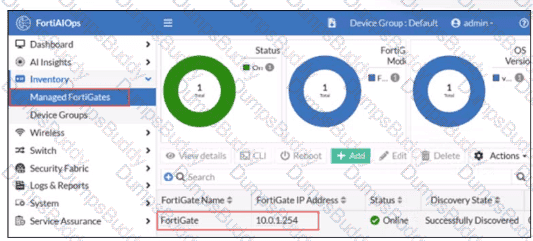
FortiGate has been added to FortiAIOps for management.
Which step must be performed on FortiAIOps to add a FortiSwitch device connected to the recently added FortiGate?
APs have been manually configured to connect to FortiGate over an IPsec network, and FortiGate successfully detects and authorizes them. However, the APs remain unmanaged because FortiGate is unable to establish a CAPWAP tunnel with them.
What configuration change can resolve this issue and enable FortiGate to establish the CAPWAP tunnel over the IPsec connection?
Refer to the exhibits.
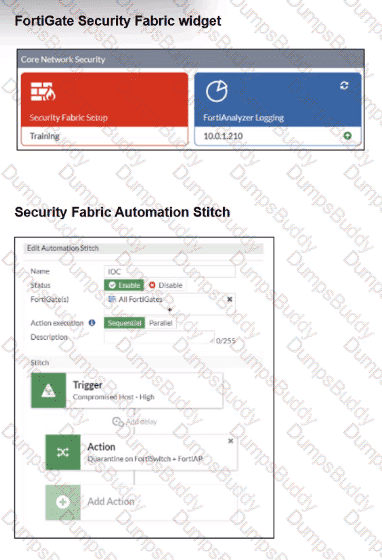
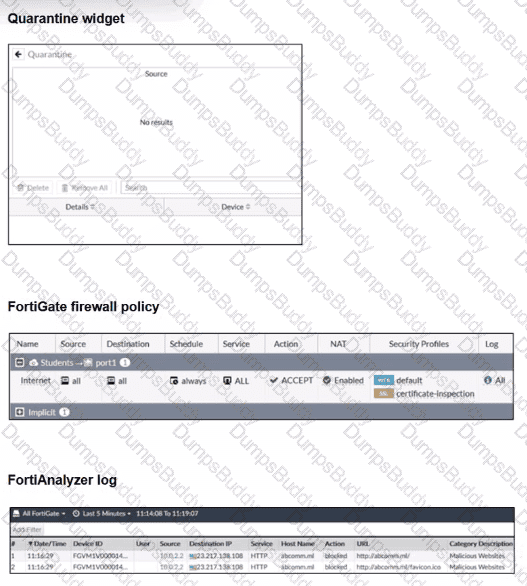
Examine the FortiGate configuration, FortiAnalyzer logs, and FortiGate widget shown in the exhibits.
Security Fabhc quarantine automation has been configured to isolate compromised devices automatically. FortiAnalyzer has been added to the Security Fabric, and an automation stitch has been configured to quarantine compromised devices.
To test the setup, a device with the IP address 10.0.2.1 that is connected through a managed FortiSwitch attempts to access a malicious website. The logs on FortiAnalyzer confirm that the event was recorded, but the device does not appear in the FortiGate quarantine widget.
Which two reasons could explain why FortiGate is not quarantining the device? (Choose two.)
Refer to the exhibits.
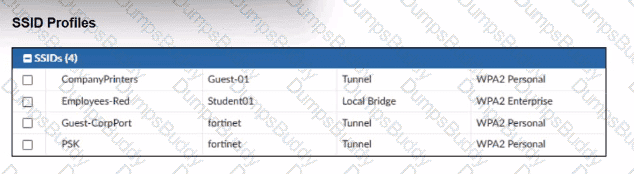
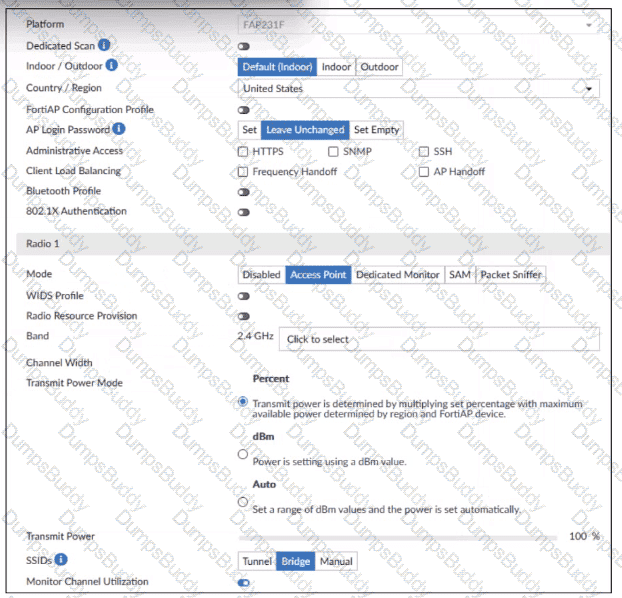
A set of SSID profiles has been configured on FortiManager, and an AP profile has been assigned to a group of AP managed by FortiGate. However, none of the designated SSIDs are being broadcast by these APs.
Which configuration change is required to make the APs broadcast these SSIDs as intended?
Which statement about generating a certificate signing request (CSR) for a CER certificate is true?
Refer to the exhibit.
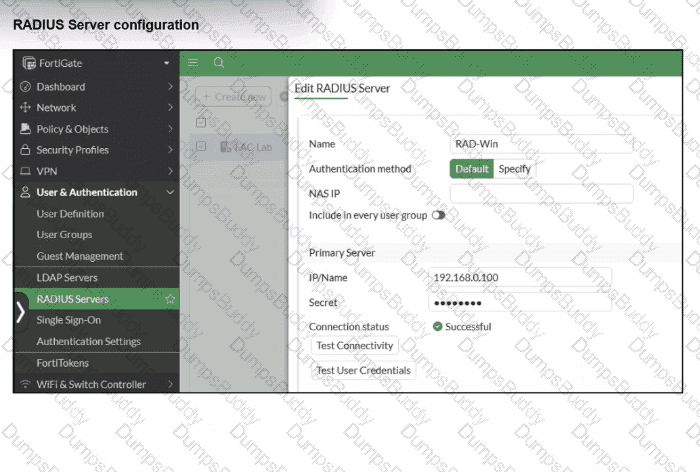
On FortiGate, a RADIUS server is configured to forward authentication requests to FortiAuthenticator, which acts as a RADIUS proxy. FortiAuthenticator then relays these authentication requests to a remote Windows AD server using LDAP.
While testing authentication using the CLI command diagnose test authserver. the administrator observed that authentication succeeded with PAP but failed when using MS-CHAFV2.
Which two solutions can the administrator implement to enable MS-CHAPv2 authentication? (Choose two.)
PDF + Testing Engine

Testing Engine
PDF (Q&A)