Pre-Summer Sale 70% Discount Offer - Ends in 0d 00h 00m 00s - Coupon code: best70

F5CAB1 BIG-IP Administration Install, Initial Configuration, and Upgrade Questions and Answers

Questions 4

In order to configure allowed IP addresses for SSH access to a BIG-IP device, the BIG-IP Administrator has issued the commands shown in the exhibit.
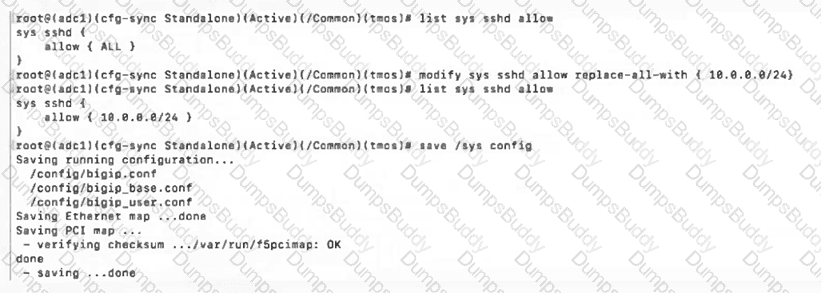
F5CAB1 Question 4

Which IP addresses will have SSH access after issuing the shown commands?

(Choose two.)

Options:

A.

10.0.0.100

B.

10.0.0.254

C.

10.0.0.256

D.

100.0.1.10

E.

100.0.0.10

Buy Now
Questions 5

The Port Lockdown feature prevents unwanted connection attempts to a Self IP.

Which three types of connection attempts are unaffected by Port Lockdown settings?

Options:

A.

Defined virtual server traffic, Secure Shell (SSH), Centralized Management Infrastructure (CMI)

B.

Centralized Management Infrastructure (CMI), Secure Shell (SSH), Internet Control Message Protocol (ICMP)

C.

Defined virtual server traffic, Internet Control Message Protocol (ICMP), Centralized Management Infrastructure (CMI)

Buy Now
Questions 6

The BIG-IP Administrator wants to manage the newly built F5 system through an in-band Self-IP .

The administrator has configured a VLAN and Self-IP and can ping the IP from their workstation, but cannot access the system via SSH or HTTPS .

What port lockdown settings should the BIG-IP Administrator use to allow management access on the Self-IP?

(Choose two.)

Options:

A.

The Self-IP port lockdown behavior could be adjusted to Allow Default

B.

The Self-IP port lockdown behavior could be adjusted to Allow All

C.

The Self-IP port lockdown behavior could be adjusted to Allow Mgmt

D.

The Self-IP port lockdown behavior could be adjusted to Allow Management

Buy Now
Questions 7

The BIG-IP Administrator needs to update access to the Configuration Utility to include the 172.28.31.0/24 and 172.28.65.0/24 networks.

From the TMOS Shell (tmsh), which command should the BIG-IP Administrator use to complete this task?

Options:

A.

modify /sys httpd allow add { 172.28.31.0/255.255.255.0 172.28.65.0/255.255.255.0 }

B.

modify /sys httpd allow add { 172.28.31.0 172.28.65.0 }

C.

modify /sys httpd permit add { 172.28.31.0/255.255.255.0 172.28.65.0/255.255.255.0 }

Buy Now
Questions 8

Which of the following are resource allocation (provisioning) settings for BIG-IP modules?

(Choose two.)

Options:

A.

Maximum

B.

Nominal

C.

Dedicated

D.

Limited

Buy Now
Questions 9

How should a BIG-IP Administrator check the provisioned CPU percent for a module?

(Choose two.)

Options:

A.

By running the top command and reviewing the output for the provisioned module.

B.

By running tmsh show /sys cpu and reviewing the specific module provisioned output.

C.

By going to System » Resource Provisioning and hovering over the CPU section colors.

D.

By running tmsh show /sys provision and reviewing the specific module in the output.

E.

By checking the Dashboard output in the Statistics tab in the GUI.

Buy Now
Questions 10

A BIG-IP Administrator needs to purchase new licenses for a BIG-IP appliance.

The administrator needs to know:

    Whether a module is licensed

    The memory requirement for that module

Where should the administrator view this information in the System menu ?

Options:

A.

Configuration » OVSDB

B.

Software Management

C.

Configuration » Device

D.

Resource Provisioning

Buy Now
Questions 11

A BIG-IP Administrator needs to install a HotFix on a standalone BIG-IP device, which has HD1.1 as the Active Boot Location.

The administrator has already re-activated the license and created a UCS archive.

In which sequence should the administrator perform the remaining steps?

Options:

A.

Install HotFix in HD1.2, Install base Image in HD1.2, Activate HD1.2

B.

Install HotFix in HD1.1, Reboot the BIG-IP device, Install UCS Archive

C.

Install base Image in HD1.2, Install HotFix in HD1.2, Activate HD1.2

D.

Activate HD1.2, Install base Image in HD1.2, Install HotFix in HD1.2

Buy Now
Questions 12

The Service Check Date on the license matches the date that the BIG-IP was installed two years ago. Which of the following activities would require the BIG-IP Administrator to renew the license and update the Service Check Date for it to work?

Options:

A.

Creating a QkView and uploading it to the F5 iHealth site for support to review.

B.

Performing a system software upgrade to a new version of BIG-IP that was just released.

C.

Uploading and installing new ASM signatures and threat campaigns to the device.

Buy Now
Questions 13

Which of the following are resource allocation settings for modules? (Pick the 2 correct responses below)

Options:

A.

Maximum

B.

Nominal

C.

Limited

D.

Dedicated

Buy Now
Questions 14

How should the BIG-IP Administrator block connections to a Self IP on port 443 while allowing connections to other ports?

Options:

A.

In the Configuration Utility, select System » Platform » SSH Allow. Enter the IP addresses of the clients allowed to connect to the Self IPs.

B.

In the Configuration Utility, select Network » Self IPs. Select the Self IP in question, then select ' Disable ' .

C.

In the Configuration Utility, go to Network » Self IPs. Select the Self IP in question, then select ' Port Lockdown ' and ' Allow Custom ' . Enter in only the allowed ports to that Self IP address.

D.

In the Configuration Utility, go to Network » Self IPs. Select the Self IP in question, then select ' Port Lockdown ' and ' Allow None ' .

Buy Now
Exam Code: F5CAB1
Exam Name: BIG-IP Administration Install, Initial Configuration, and Upgrade
Last Update: May 26, 2026
Questions: 49

PDF + Testing Engine

$134.99

Testing Engine

$99.99

PDF (Q&A)

$84.99