New Year Sale 70% Discount Offer - Ends in 0d 00h 00m 00s - Coupon code: best70

RVT_ELEC_01101 Autodesk Certified Professional in Revit for Electrical Design Questions and Answers

Questions 4

An electrical designer is working on a project with multiple buildings. The designer wants to organize the Project Browser by building For example, all views related to Building A will be sorted under Building A. and all views related to Building B will be sorted under Building B.

The designer decides to create a new parameter, assign it to views, and then sort the Project Browser according to the new parameter.

Which parameter should the designer use?

Options:

A.

A reporting parameter

B.

A global parameter

C.

A project parameter

D.

A family parameter

Buy Now
Questions 5

Refer to exhibit.

A panelboard has the following properties:
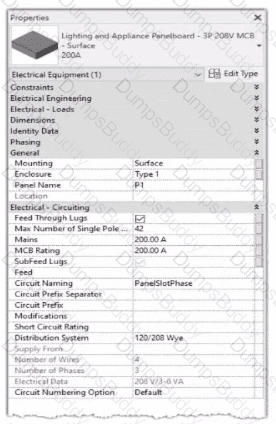
RVT_ELEC_01101 Question 5

The Circuit Naming Scheme PanelSlolPhase. which defines the value of the Circuit Number parameter, is configured as follows:
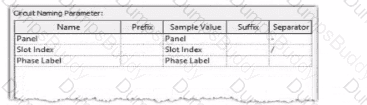
RVT_ELEC_01101 Question 5

In electrical settings. Phase Labels have not been modified from the default "A." "B." and "C-

The Circuit Number lot a single-pole circuit in the panelboard's first breaker position is----------(Enter the correct value into the field)

Options:

Buy Now
Questions 6

Refer to exhibit.

RVT_ELEC_01101 Question 6

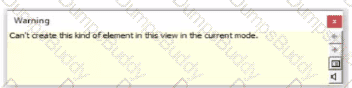
An electrical designer tries to place a generic annotation family in a data device family. The designer receives the error message as shown. What should the designer do?

Options:

A.

Change the Detail Level to Coarse.

B.

Edit the generic annotation family and set it to Shared.

C.

Set the view to the Ref. Level.

D.

Select the Maintain Annotation Orientation parameter checkbox

Buy Now
Questions 7

An electrical designer wants to schedule parameters from generic annotations Which type of schedule must be created?

Options:

A.

A Generic Family schedule

B.

A Generic Annotation schedule

C.

A Note Block

D.

D. A Sheet List

Buy Now
Questions 8

Refer to exhibit.

(The image is presented in Imperial units: 1 In = 25 mm (Metric units rounded).)
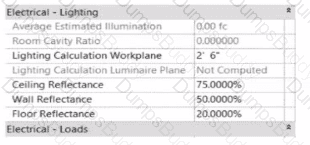
RVT_ELEC_01101 Question 8

In the space properties for the space, the Lighting Calculation Luminaire Plane is Not Computed. What is causing this issue?

Options:

A.

The lighting fixtures are missing an IES file.

B.

No lights are placed in the space.

C.

The lights in this space are not circuited.

D.

Lights are at different elevations in the same space.

Buy Now
Questions 9

Which condition applies when placing a colling-hosted light fixture?

Options:

A.

The light must be snapped to the celling using nodes.

B.

The light must be hosted to the celling reference plane.

C.

The light must be defined in the ceiling layout pattern.

D.

The light must be placed in the same model as the ceiling

Buy Now
Questions 10

Refer to exhibit.

RVT_ELEC_01101 Question 10

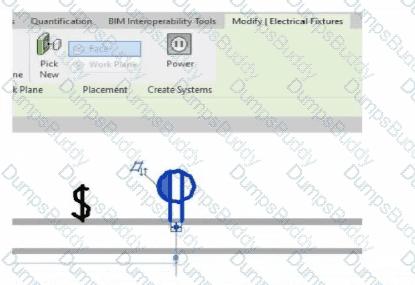
An electrical designer is circuiting a dwelling unit. The receptacle (electrical fixture) shown must be controlled by the switch (lighting device) shown to switch a plug-in lamp When the receptacle is selected, Revit does not provide an option to add the receptacle to a switch system.

What is causing this issue?

Options:

A.

A switch system has not yet been created.

B.

The receptacle's "Switchable" option Is not selected within the family editor.

C.

The switch and the receptacle are not on the same circuit

D.

Only lighting fixtures can be added to switch systems.

Buy Now
Questions 11

Exhibit.

RVT_ELEC_01101 Question 11

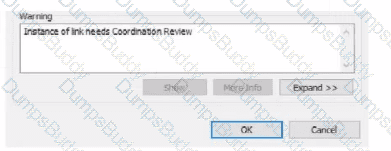
An electrical designer is working within a workshared electrical model The designer reloads the linked architectural model and receives the message as shown in the exhibit What does this message indicate?

Options:

A.

There is a new interference with the architectural model.

B.

There is a new coordination message within the architectural model.

C.

An elements host within the architectural model has changed.

D.

A monitored element in the architectural model has changed.

Buy Now
Questions 12

Refer to exhibits.

RVT_ELEC_01101 Question 12

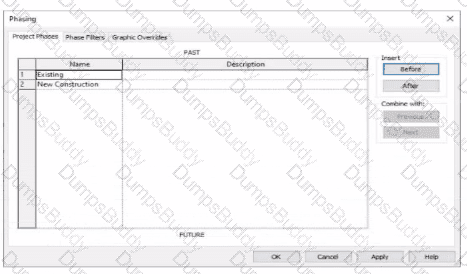
An electrical designer models an existing receptacle on an existing wall that the architect has indicated to be demolished.
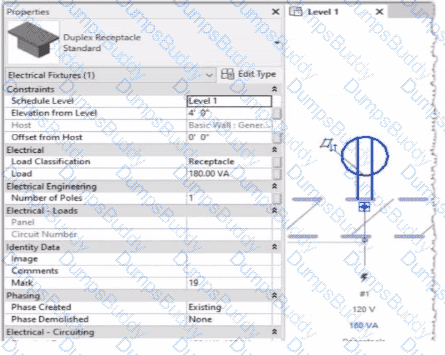
RVT_ELEC_01101 Question 12

The view is intended to show demolition, and the view's Phase is set to New Construction. How should the designer indicate that the receptacle must also be demolished?

Options:

A.

Add a Demolition phase, then set the receptacle parameter Phase Demolished to Demolition.

B.

Set the receptacle parameter Phase Demolished to Demolition.

C.

Set the receptacle parameter Phase Demolished to New Construction.

D.

Set the receptacle's type parameter Match Phasing to Host.

Buy Now
Questions 13

An electrical designer has created a family and loaded It Into the project. The designer wants to connect the family to a power circuit but the Power icon is not available when the family Is selected.

How should the designer fix the problem?

Options:

A.

Set the distribution system for the family.

B.

Set the family parameter to Shared.

C.

Change the Voltage parameter value to non-zero.

D.

Add an electrical connector to the family.

Buy Now
Questions 14

An electrical designer is trying to adjust the scale of a view. All icons on the View Control Bar are dimmed (not enabled). How should the designer make the view scale editable only for this view?

Options:

A.

Set the view template to

B.

Edit the assigned view template.

C.

Duplicate the view with Detailing.

D.

Right-click on the scale and select .

Buy Now
Questions 15

An electrical designer needs to add spaces to a model displaying the architectural room name and number. What should the designer do before creating the spaces?
Options:

A.

Select Room Bounding from the architectural link's type properties.

B.

Change the architectural model display settings to By Host View,

C.

Use Transfer Project Standards to Import rooms from the architectural model.

D.

Select Save Positions for the architectural links in the Manage Links dialog.

Buy Now
Questions 16

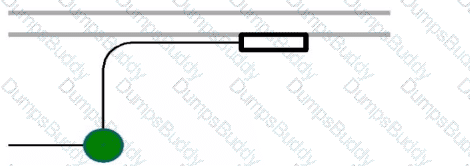
Refer to the exhibit.

RVT_ELEC_01101 Question 16

Options:

A.

Project Browser > Conduits > Conduits with Fittings > Single Line Symbology

B.

Properties > Edit Type > Single Line Symbology

C.

Object Styles > Conduits > Rise/Drop > Single Line Symbology

D.

Electrical Settings > Conduit Settings > Rise Drop > Single Line Symbology

Buy Now
Questions 17

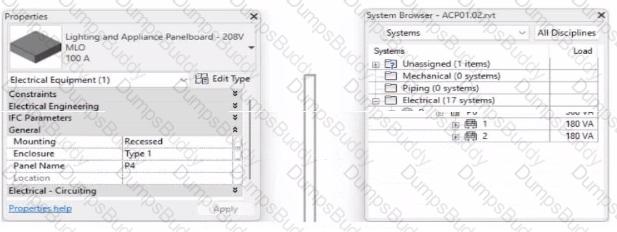
Refer to exhibit.

RVT_ELEC_01101 Question 17

To which panel Is Panel P4 circuited?

Options:

A.

Panel P 1

B.

Panel P 2

C.

Panel P 5

D.

Panel P 3

Buy Now
Questions 18

An electrical designer needs to add a drafting view to a model from another project. What is the method to do this?

Options:

A.

Select Transfer Project Standards, select the desired project, and then select the drafting view.

B.

Select Open, select the desired project, right-click the desired drafting view, and then copy/paste

C.

Select Link Revit, browse to the desired model, and then select desired drafting view

D.

Select Insert from File, select Insert Views from File, browse to the desired project, and then select the drafting view.

Buy Now
Exam Code: RVT_ELEC_01101
Exam Name: Autodesk Certified Professional in Revit for Electrical Design
Last Update: Dec 15, 2025
Questions: 63

PDF + Testing Engine

$134.99

Testing Engine

$99.99

PDF (Q&A)

$84.99