A data platform team creates two multi-cluster virtual warehouses with the AUTO_SUSPEND value set to NULL on one. and '0' on the other. What would be the execution behavior of these virtual warehouses?
Setting a '0' or NULL value means the warehouses will never suspend.
Setting a '0' or NULL value means the warehouses will suspend immediately.
Setting a '0' or NULL value means the warehouses will suspend after the default of 600 seconds.
Setting a '0' value means the warehouses will suspend immediately, and NULL means the warehouses will never suspend.
The AUTO_SUSPEND parameter controls the amount of time, in seconds, of inactivity after which a warehouse is automatically suspended. If the parameter is set to NULL, the warehouse never suspends. If the parameter is set to ‘0’, the warehouse suspends immediately after executing a query. Therefore, the execution behavior of the two virtual warehouses will be different depending on the AUTO_SUSPEND value. The warehouse with NULL value will keep running until it is manually suspended or the resource monitor limits are reached. The warehouse with ‘0’ value will suspend as soon as it finishes a query and release the compute resources. References:
ALTER WAREHOUSE
Parameters
A user can change object parameters using which of the following roles?
ACCOUNTADMIN, SECURITYADMIN
SYSADMIN, SECURITYADMIN
ACCOUNTADMIN, USER with PRIVILEGE
SECURITYADMIN, USER with PRIVILEGE
According to the Snowflake documentation, object parameters are parameters that can be set on individual objects such as databases, schemas, tables, and stages. Object parameters can be set by users with the appropriate privileges on the objects. For example, to set the object parameter AUTO_REFRESH on a table, the user must have the MODIFY privilege on the table. The ACCOUNTADMIN role has the highest level of privileges on all objects in the account, so it can set any object parameter on any object. However, other roles, such as SECURITYADMIN or SYSADMIN, do not have the same level of privileges on all objects, so they cannot set object parameters on objects they do not own or have the required privileges on. Therefore, the correct answer is C. ACCOUNTADMIN, USER with PRIVILEGE.
Parameters | Snowflake Documentation
Object Parameters | Snowflake Documentation
Object Privileges | Snowflake Documentation
An Architect uses COPY INTO with the ON_ERROR=SKIP_FILE option to bulk load CSV files into a table called TABLEA, using its table stage. One file named file5.csv fails to load. The Architect fixes the file and re-loads it to the stage with the exact same file name it had previously.
Which commands should the Architect use to load only file5.csv file from the stage? (Choose two.)
COPY INTO tablea FROM @%tablea RETURN_FAILED_ONLY = TRUE;
COPY INTO tablea FROM @%tablea;
COPY INTO tablea FROM @%tablea FILES = ('file5.csv');
COPY INTO tablea FROM @%tablea FORCE = TRUE;
COPY INTO tablea FROM @%tablea NEW_FILES_ONLY = TRUE;
COPY INTO tablea FROM @%tablea MERGE = TRUE;
Option A (RETURN_FAILED_ONLY) will only load files that previously failed to load. Since file5.csv already exists in the stage with the same name, it will not be considered a new file and will not be loaded.
Option D (FORCE) will overwrite any existing data in the table. This is not desired as we only want to load the data from file5.csv.
Option E (NEW_FILES_ONLY) will only load files that have been added to the stage since the last COPY command. This will not work because file5.csv was already in the stage before it was fixed.
Option F (MERGE) is used to merge data from a stage into an existing table, creating new rows for any data not already present. This is not needed in this case as we simply want to load the data from file5.csv.
Therefore, the architect can use either COPY INTO tablea FROM @%tablea or COPY INTO tablea FROM @%tablea FILES = ('file5.csv') to load only file5.csv from the stage. Both options will load the data from the specified file without overwriting any existing data or requiring additional configuration
An Architect needs to allow a user to create a database from an inbound share.
To meet this requirement, the user’s role must have which privileges? (Choose two.)
IMPORT SHARE;
IMPORT PRIVILEGES;
CREATE DATABASE;
CREATE SHARE;
IMPORT DATABASE;
According to the Snowflake documentation, to create a database from an inbound share, the user’s role must have the following privileges:
The CREATE DATABASE privilege on the current account. This privilege allows the user to create a new database in the account1.
The IMPORT DATABASE privilege on the share. This privilege allows the user to import a database from the share into the account2. The other privileges listed are not relevant for this requirement. The IMPORT SHARE privilege is used to import a share into the account, not a database3. The IMPORT PRIVILEGES privilege is used to import the privileges granted on the shared objects, not the objects themselves2. The CREATE SHARE privilege is used to create a share to provide data to other accounts, not to consume data from other accounts4.
CREATE DATABASE | Snowflake Documentation
Importing Data from a Share | Snowflake Documentation
Importing a Share | Snowflake Documentation
CREATE SHARE | Snowflake Documentation
A healthcare company wants to share data with a medical institute. The institute is running a Standard edition of Snowflake; the healthcare company is running a Business Critical edition.
How can this data be shared?
The healthcare company will need to change the institute’s Snowflake edition in the accounts panel.
By default, sharing is supported from a Business Critical Snowflake edition to a Standard edition.
Contact Snowflake and they will execute the share request for the healthcare company.
Set the share_restriction parameter on the shared object to false.
By default, Snowflake does not allow sharing data from a Business Critical edition to a non-Business Critical edition. This is because Business Critical edition provides enhanced security and data protection features that are not available in lower editions. However, this restriction can be overridden by setting the share_restriction parameter on the shared object (database, schema, or table) to false. This parameter allows the data provider to explicitly allow sharing data with lower edition accounts. Note that this parameter can only be set by the data provider, not the data consumer. Also, setting this parameter to false may reduce the level of security and data protection for the shared data.
Enable Data Share:Business Critical Account to Lower Edition
Sharing Is Not Allowed From An Account on BUSINESS CRITICAL Edition to an Account On A Lower Edition
SQL Execution Error: Sharing is Not Allowed from an Account on BUSINESS CRITICAL Edition to an Account on a Lower Edition
Snowflake Editions | Snowflake Documentation
Which of the following are characteristics of how row access policies can be applied to external tables? (Choose three.)
An external table can be created with a row access policy, and the policy can be applied to the VALUE column.
A row access policy can be applied to the VALUE column of an existing external table.
A row access policy cannot be directly added to a virtual column of an external table.
External tables are supported as mapping tables in a row access policy.
While cloning a database, both the row access policy and the external table will be cloned.
A row access policy cannot be applied to a view created on top of an external table.
These three statements are true according to the Snowflake documentation and the web search results. A row access policy is a feature that allows filtering rows based on user-defined conditions. A row access policy can be applied to an external table, which is a table that reads data from external files in a stage. However, there are some limitations and considerations for using row access policies with external tables.
An external table can be created with a row access policy by using the WITH ROW ACCESS POLICY clause in the CREATE EXTERNAL TABLE statement. The policy can be applied to theVALUE column, which is the column that contains the raw data from the external files in a VARIANT data type1.
A row access policy can also be applied to the VALUE column of an existing external table by using the ALTER TABLE statement with the SET ROW ACCESS POLICY clause2.
A row access policy cannot be directly added to a virtual column of an external table. A virtual column is a column that is derived from the VALUE column using an expression. To apply a row access policy to a virtual column, the policy must be applied to the VALUE column and the expression must be repeated in the policy definition3.
External tables are not supported as mapping tables in a row access policy. A mapping table is a table that is used to determine the access rights of users or roles based on some criteria. Snowflake does not support using an external table as a mapping table because it may cause performance issues or errors4.
While cloning a database, Snowflake clones the row access policy, but not the external table. Therefore, the policy in the cloned database refers to a table that is not present in the cloned database. To avoid this issue, the external table must be manually cloned or recreated in the cloned database4.
A row access policy can be applied to a view created on top of an external table. The policy can be applied to the view itself or to the underlying external table. However, if the policy is applied to the view, the view must be a secure view, which is a view that hides the underlying data and the view definition from unauthorized users5.
CREATE EXTERNAL TABLE | Snowflake Documentation
ALTER EXTERNAL TABLE | Snowflake Documentation
Understanding Row Access Policies | Snowflake Documentation
Snowflake Data Governance: Row Access Policy Overview
Secure Views | Snowflake Documentation
Which of the following are characteristics of Snowflake’s parameter hierarchy?
Session parameters override virtual warehouse parameters.
Virtual warehouse parameters override user parameters.
Table parameters override virtual warehouse parameters.
Schema parameters override account parameters.
In Snowflake's parameter hierarchy, virtual warehouse parameters take precedence over user parameters. This hierarchy is designed to ensure that settings at the virtual warehouse level, which typically reflect the requirements of a specific workload or set of queries, override the preferences set at the individual user level. This helps maintain consistent performance and resource utilization as specified by the administrators managing the virtual warehouses.
The following table exists in the production database:
A regulatory requirement states that the company must mask the username for events that are older than six months based on the current date when the data is queried.
How can the requirement be met without duplicating the event data and making sure it is applied when creating views using the table or cloning the table?
Use a masking policy on the username column using a entitlement table with valid dates.
Use a row level policy on the user_events table using a entitlement table with valid dates.
Use a masking policy on the username column with event_timestamp as a conditional column.
Use a secure view on the user_events table using a case statement on the username column.
A masking policy is a feature of Snowflake that allows masking sensitive data in query results based on the role of the user and the condition of the data. A masking policy can be applied to a column in a table or a view, and it can use another column in the same table or view as a conditional column. A conditional column is a column that determines whether the masking policy is applied or not based on its value1.
In this case, the requirement can be met by using a masking policy on the username column with event_timestamp as a conditional column. The masking policy can use a function that masks the username if the event_timestamp is older than six months based on the current date, and returns the original username otherwise. The masking policy canbe applied to the user_events table, and it will also be applied when creating views using the table or cloning the table2.
The other options are not correct because:
A. Using a masking policy on the username column using an entitlement table with valid dates would require creating another table that stores the valid dates for each username, and joining it with the user_events table in the masking policy function. This would add complexity and overhead to the masking policy, and it would not use the event_timestamp column as the condition for masking.
B. Using a row level policy on the user_events table using an entitlement table with valid dates would require creating another table that stores the valid dates for each username, and joining it with the user_events table in the row access policy function. This would filter out the rows that have event_timestamp older than six months based on the valid dates, instead of masking the username column. This would not meet the requirement of masking the username, and it would also reduce the visibility of the event data.
D. Using a secure view on the user_events table using a case statement on the username column would require creating a view that uses a case expression to mask the username column based on the event_timestamp column. This would meet the requirement of masking the username, but it would not be applied when cloning the table. A secure view is a view that prevents the underlying data from being exposed by queries on the view. However, a secure view does not prevent the underlying data from being exposed by cloning the table3.
1: Masking Policies | Snowflake Documentation
2: Using Conditional Columns in Masking Policies | Snowflake Documentation
3: Secure Views | Snowflake Documentation
A company wants to Integrate its main enterprise identity provider with federated authentication with Snowflake.
The authentication integration has been configured and roles have been created in Snowflake. However, the users are not automatically appearing in Snowflake when created and their group membership is not reflected in their assigned rotes.
How can the missing functionality be enabled with the LEAST amount of operational overhead?
OAuth must be configured between the identity provider and Snowflake. Then the authorization server must be configured with the right mapping of users and roles.
OAuth must be configured between the identity provider and Snowflake. Then the authorization server must be configured with the right mapping of users, and the resource server must be configured with the right mapping of role assignment.
SCIM must be enabled between the identity provider and Snowflake. Once both are synchronized through SCIM, their groups will get created as group accounts in Snowflake and the proper roles can be granted.
SCIM must be enabled between the identity provider and Snowflake. Once both are synchronized through SCIM. users will automatically get created and their group membership will be reflected as roles In Snowflake.
The best way to integrate an enterprise identity provider with federated authentication and enable automatic user creation and role assignment in Snowflake is to use SCIM (System for Cross-domain Identity Management). SCIM allows Snowflake to synchronize with the identity provider and create users and groups based on the information provided by the identity provider. The groups are mapped to roles in Snowflake, and the users are assigned the roles based on their group membership. This way, the identity provider remains the source of truth for user and group management, and Snowflake automatically reflects the changes without manual intervention. The other options are either incorrect or incomplete, as they involve using OAuth, which is a protocol for authorization, not authentication or user provisioning, and require additional configuration of authorization and resource servers.
Which feature provides the capability to define an alternate cluster key for a table with an existing cluster key?
External table
Materialized view
Search optimization
Result cache
A materialized view is a feature that provides the capability to define an alternate cluster key for a table with an existing cluster key. A materialized view is a pre-computed result set that is stored in Snowflake and can be queried like a regular table. A materialized view can have a different cluster key than the base table, which can improve the performance and efficiency of queries on the materialized view. A materialized view can also support aggregations, joins, and filters on the base table data. A materialized view is automatically refreshed when the underlying data in the base table changes, as long as the AUTO_REFRESH parameter is set to true1.
Materialized Views | Snowflake Documentation
When loading data into a table that captures the load time in a column with a default value of either CURRENT_TIME () or CURRENT_TIMESTAMP() what will occur?
All rows loaded using a specific COPY statement will have varying timestamps based on when the rows were inserted.
Any rows loaded using a specific COPY statement will have varying timestamps based on when the rows were read from the source.
Any rows loaded using a specific COPY statement will have varying timestamps based on when the rows were created in the source.
All rows loaded using a specific COPY statement will have the same timestamp value.
According to the Snowflake documentation, when loading data into a table that captures the load time in a column with a default value of either CURRENT_TIME () or CURRENT_TIMESTAMP(), the default value is evaluated once per COPY statement, not once per row. Therefore, all rows loaded using a specific COPY statement will have the same timestamp value. This behavior ensures that the timestamp value reflects the time when the data was loaded into the table, not when the data was read from the source or created in the source. References:
Snowflake Documentation: Loading Data into Tables with Default Values
Snowflake Documentation: COPY INTO table
Which technique will efficiently ingest and consume semi-structured data for Snowflake data lake workloads?
IDEF1X
Schema-on-write
Schema-on-read
Information schema
Option C is the correct answer because schema-on-read is a technique that allows Snowflake to ingest and consume semi-structured data without requiring a predefined schema. Snowflake supports various semi-structured data formats such as JSON, Avro, ORC, Parquet, and XML, and provides native data types (ARRAY, OBJECT, and VARIANT) for storing them. Snowflake also provides native support for querying semi-structured data using SQL and dot notation. Schema-on-read enables Snowflake to query semi-structured data at the same speed as performing relational queries while preserving the flexibility of schema-on-read. Snowflake’s near-instant elasticity rightsizes compute resources, and consumption-based pricing ensures you only pay for what you use.
Option A is incorrect because IDEF1X is a data modeling technique that defines the structure and constraints of relational data using diagrams and notations. IDEF1X is not suitable for ingesting and consuming semi-structured data, which does not have a fixed schema or structure.
Option B is incorrect because schema-on-write is a technique that requires defining a schema before loading and processing data. Schema-on-write is not efficient for ingesting and consuming semi-structured data, which may have varying or complex structures that are difficult to fit into a predefined schema. Schema-on-write also introduces additional overhead and complexity for data transformation and validation.
Option D is incorrect because information schema is a set of metadata views that provide information about the objects and privileges in a Snowflake database. Information schema is not a technique for ingesting and consuming semi-structured data, but rather a way of accessing metadata about the data.
The following DDL command was used to create a task based on a stream:
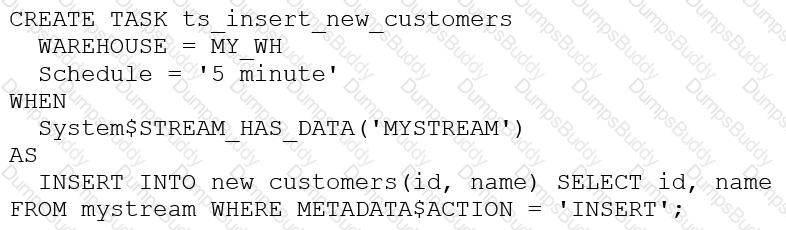
Assuming MY_WH is set to auto_suspend – 60 and used exclusively for this task, which statement is true?
The warehouse MY_WH will be made active every five minutes to check the stream.
The warehouse MY_WH will only be active when there are results in the stream.
The warehouse MY_WH will never suspend.
The warehouse MY_WH will automatically resize to accommodate the size of the stream.
The warehouse MY_WH will only be active when there are results in the stream. This is because the task is created based on a stream, which means that the task will only be executed when there are new data in the stream. Additionally, the warehouse is set to auto_suspend - 60, which means that the warehouse will automatically suspend after 60 seconds of inactivity. Therefore, the warehouse will only be active when there are results in the stream. References:
[CREATE TASK | Snowflake Documentation]
[Using Streams and Tasks | Snowflake Documentation]
[CREATE WAREHOUSE | Snowflake Documentation]
Based on the Snowflake object hierarchy, what securable objects belong directly to a Snowflake account? (Select THREE).
Database
Schema
Table
Stage
Role
Warehouse
A securable object is an entity to which access can be granted in Snowflake. Securable objects include databases, schemas, tables, views, stages, pipes, functions, procedures, sequences, tasks, streams, roles, warehouses, and shares1.
The Snowflake object hierarchy is a logical structure that organizes the securable objects in a nested manner. The top-most container is the account, which contains all the databases, roles, and warehouses for the customer organization. Each database contains schemas, which in turn contain tables, views, stages, pipes, functions, procedures, sequences, tasks, and streams. Each role can be granted privileges on other roles or securable objects. Each warehouse can be used to execute queries on securable objects2.
Based on the Snowflake object hierarchy, the securable objects that belong directly to a Snowflake account are databases, roles, and warehouses. These objects are created and managed at the account level, and do not depend on any other securable object. The other options are not correct because:
Schemas belong to databases, not to accounts. A schema must be created within an existing database3.
Tables belong to schemas, not to accounts. A table must be created within an existing schema4.
Stages belong to schemas or tables, not to accounts. A stage must be created within an existing schema or table.
1: Overview of Access Control | Snowflake Documentation
2: Securable Objects | Snowflake Documentation
3: CREATE SCHEMA | Snowflake Documentation
4: CREATE TABLE | Snowflake Documentation
[5]: CREATE STAGE | Snowflake Documentation
A new table and streams are created with the following commands:
CREATE OR REPLACE TABLE LETTERS (ID INT, LETTER STRING) ;
CREATE OR REPLACE STREAM STREAM_1 ON TABLE LETTERS;
CREATE OR REPLACE STREAM STREAM_2 ON TABLE LETTERS APPEND_ONLY = TRUE;
The following operations are processed on the newly created table:
INSERT INTO LETTERS VALUES (1, 'A');
INSERT INTO LETTERS VALUES (2, 'B');
INSERT INTO LETTERS VALUES (3, 'C');
TRUNCATE TABLE LETTERS;
INSERT INTO LETTERS VALUES (4, 'D');
INSERT INTO LETTERS VALUES (5, 'E');
INSERT INTO LETTERS VALUES (6, 'F');
DELETE FROM LETTERS WHERE ID = 6;
What would be the output of the following SQL commands, in order?
SELECT COUNT (*) FROM STREAM_1;
SELECT COUNT (*) FROM STREAM_2;
2 & 6
2 & 3
4 & 3
4 & 6
In Snowflake, a stream records data manipulation language (DML) changes to its base table since the stream was created or last consumed. STREAM_1 will show all changes including the TRUNCATE operation, while STREAM_2, being APPEND_ONLY, will not show deletions like TRUNCATE. Therefore, STREAM_1 will count the three inserts, the TRUNCATE (counted as a single operation), and the subsequent two inserts before the delete, totaling 4. STREAM_2 will only count the three initial inserts and the two after the TRUNCATE, totaling 3, as it does not count the TRUNCATE or the delete operation.
A user has the appropriate privilege to see unmasked data in a column.
If the user loads this column data into another column that does not have a masking policy, what will occur?
Unmasked data will be loaded in the new column.
Masked data will be loaded into the new column.
Unmasked data will be loaded into the new column but only users with the appropriate privileges will be able to see the unmasked data.
Unmasked data will be loaded into the new column and no users will be able to see the unmasked data.
According to the SnowPro Advanced: Architect documents and learning resources, column masking policies are applied at query time based on the privileges of the user who runs the query. Therefore, if a user has the privilege to see unmasked data in a column, they will see the original data when they query that column. If they load this column data into another column that does not have a masking policy, the unmasked data will be loaded in the new column, and any user who can query the new column will see the unmasked data as well. The masking policy does not affect the underlying data in the column, only the query results.
Snowflake Documentation: Column Masking
Snowflake Learning: Column Masking
Which organization-related tasks can be performed by the ORGADMIN role? (Choose three.)
Changing the name of the organization
Creating an account
Viewing a list of organization accounts
Changing the name of an account
Deleting an account
Enabling the replication of a database
Company A would like to share data in Snowflake with Company B. Company B is not on the same cloud platform as Company A.
What is required to allow data sharing between these two companies?
Create a pipeline to write shared data to a cloud storage location in the target cloud provider.
Ensure that all views are persisted, as views cannot be shared across cloud platforms.
Setup data replication to the region and cloud platform where the consumer resides.
Company A and Company B must agree to use a single cloud platform: Data sharing is only possible if the companies share the same cloud provider.
According to the SnowPro Advanced: Architect documents and learning resources, the requirement to allow data sharing between two companies that are not on the same cloud platform is to set up data replication to the region and cloud platform where the consumer resides. Data replication is a feature of Snowflake that enables copying databases across accounts in different regions and cloud platforms. Data replication allows data providers to securely share data with data consumers across different regions and cloud platforms by creating a replica database in the consumer’s account. The replica database is read-only and automatically synchronized with the primary database in the provider’s account. Data replication is useful for scenarios where data sharing is not possible or desirable due to latency, compliance, or security reasons1. The other options are incorrect because they are not required or feasible to allow data sharing between two companies that are not on the same cloud platform. Option A is incorrect because creating a pipeline to write shared data to a cloud storage location in the target cloud provider is not a secure or efficient way of sharing data. It would require additional steps to load the data from the cloud storage to the consumer’s account, and it would not leverage the benefits of Snowflake’s data sharing features. Option B is incorrect because ensuring that all views are persisted is not relevant for data sharing across cloud platforms. Views can be shared across cloud platforms as long as they reference objects in the same database. Persisting views is an option to improve the performance of querying views, but it is notrequired for data sharing2. Option D is incorrect because Company A and Company B do not need to agree to use a single cloud platform. Data sharing is possible across different cloud platforms using data replication or other methods, such as listings or auto-fulfillment3. References: ReplicatingDatabases Across Multiple Accounts | Snowflake Documentation, Persisting Views | Snowflake Documentation, Sharing Data Across Regions and Cloud Platforms | Snowflake Documentation
What is a characteristic of event notifications in Snowpipe?
The load history is stored In the metadata of the target table.
Notifications identify the cloud storage event and the actual data in the files.
Snowflake can process all older notifications when a paused pipe Is resumed.
When a pipe Is paused, event messages received for the pipe enter a limited retention period.
Event notifications in Snowpipe are messages sent by cloud storage providers to notify Snowflake of new or modified files in a stage. Snowpipe uses these notifications to trigger data loading from the stage to the target table. When a pipe is paused, event messages received for the pipe enter a limited retention period, which varies depending on the cloud storage provider. If the pipe is not resumed within the retention period, the event messages will be discarded and the data will not be loaded automatically. To load the data, the pipe must be resumed and the COPY command must be executed manually. This is a characteristic of event notifications in Snowpipe that distinguishes them from other options. References: Snowflake Documentation: Using Snowpipe, Snowflake Documentation: Pausing and Resuming a Pipe
An Architect is troubleshooting a query with poor performance using the QUERY function. The Architect observes that the COMPILATION_TIME Is greater than the EXECUTION_TIME.
What is the reason for this?
The query is processing a very large dataset.
The query has overly complex logic.
The query Is queued for execution.
The query Is reading from remote storage
The correct answer is B because the compilation time is the time it takes for the optimizer to create an optimal query plan for the efficient execution of the query. The compilation time depends on the complexity of the query, such as the number of tables, columns, joins, filters, aggregations, subqueries, etc. The more complex the query, the longer it takes to compile.
Option A is incorrect because the query processing time is not affected by the size of the dataset, but by the size of the virtual warehouse. Snowflake automatically scales the compute resources to match the data volume and parallelizes the query execution. The size of the dataset may affect the execution time, but not the compilation time.
Option C is incorrect because the query queue time is not part of the compilation time or the execution time. It is a separate metric that indicates how long the query waits for a warehouse slot before it starts running. The query queue time depends on the warehouse load, concurrency, and priority settings.
Option D is incorrect because the query remote IO time is not part of the compilation time or the execution time. It is a separate metric that indicates how long the query spends reading data from remote storage, such as S3 or Azure Blob Storage. The query remote IO time depends on the network latency, bandwidth, and caching efficiency. References:
Understanding Why Compilation Time in Snowflake Can Be Higher than Execution Time: This article explains why the total duration (compilation + execution) time is an essential metric to measure query performance in Snowflake. It discusses the reasons for the long compilation time, including query complexity and the number of tables and columns.
Exploring Execution Times: This document explains how to examine the past performance of queries and tasks using Snowsight or by writing queries against views in the ACCOUNT_USAGE schema. It also describes the different metrics and dimensions that affect query performance, such as duration, compilation, execution, queue, and remote IO time.
What is the “compilation time” and how to optimize it?: This community post provides some tips and best practices on how to reduce the compilation time, such as simplifying the query logic, using views or common table expressions, and avoiding unnecessary columns or joins.
What is a valid object hierarchy when building a Snowflake environment?
Account --> Database --> Schema --> Warehouse
Organization --> Account --> Database --> Schema --> Stage
Account --> Schema > Table --> Stage
Organization --> Account --> Stage --> Table --> View
This is the valid object hierarchy when building a Snowflake environment, according to the Snowflake documentation and the web search results. Snowflake is a cloud data platform that supports various types of objects, such as databases, schemas, tables, views, stages, warehouses, and more. These objects are organized in a hierarchical structure, as follows:
Organization: An organization is the top-level entity that represents a group of Snowflake accounts that are related by business needs or ownership. An organization can have one or more accounts, and can enable features such as cross-account data sharing, billing and usage reporting, and single sign-on across accounts12.
Account: An account is the primary entity that represents a Snowflake customer. An account can have one or more databases, schemas, stages, warehouses, and other objects. An account can also have one or more users, roles, and security integrations. An account is associated with a specific cloud platform, region, and Snowflake edition34.
Database: A database is a logical grouping of schemas. A database can have one or more schemas, and can store structured, semi-structured, or unstructured data. A database can also have properties such as retention time, encryption, and ownership56.
Schema: A schema is a logical grouping of tables, views, stages, and other objects. A schema can have one or more objects, and can define the namespace and access control for the objects. A schema can also have properties such as ownership and default warehouse .
Stage: A stage is a named location that references the files in external or internal storage. A stage can be used to load data into Snowflake tables using the COPY INTO command, or to unload data from Snowflake tables using the COPY INTO LOCATION command. A stage can be created at the account, database, or schema level, and can have properties such as file format, encryption, and credentials .
The other options listed are not valid object hierarchies, because they either omit or misplace some objects in the structure. For example, option A omits the organization level and places the warehouse under the schema level, which is incorrect. Option C omits the organization, account, and stage levels, and places the table under the schema level, which is incorrect. Option D omits the database level and places the stage and table under the account level, which is incorrect.
Snowflake Documentation: Organizations
Snowflake Blog: Introducing Organizations in Snowflake
Snowflake Documentation: Accounts
Snowflake Blog: Understanding Snowflake Account Structures
Snowflake Documentation: Databases
Snowflake Blog: How to Create a Database in Snowflake
[Snowflake Documentation: Schemas]
[Snowflake Blog: How to Create a Schema in Snowflake]
[Snowflake Documentation: Stages]
[Snowflake Blog: How to Use Stages in Snowflake]
A Snowflake Architect Is working with Data Modelers and Table Designers to draft an ELT framework specifically for data loading using Snowpipe. The Table Designers will add a timestamp column that Inserts the current tlmestamp as the default value as records are loaded into a table. The Intent is to capture the time when each record gets loaded into the table; however, when tested the timestamps are earlier than the loae_take column values returned by the copy_history function or the Copy_HISTORY view (Account Usage).
Why Is this occurring?
The timestamps are different because there are parameter setup mismatches. The parameters need to be realigned
The Snowflake timezone parameter Is different from the cloud provider's parameters causing the mismatch.
The Table Designer team has not used the localtimestamp or systimestamp functions in the Snowflake copy statement.
The CURRENT_TIMEis evaluated when the load operation is compiled in cloud services rather than when the record is inserted into the table.
The correct answer is D because the CURRENT_TIME function returns the current timestamp at the start of the statement execution, not at the time of the record insertion. Therefore, if the load operation takes some time to complete, the CURRENT_TIME value may be earlier than the actual load time.
Option A is incorrect because the parameter setup mismatches do not affect the timestamp values. The parameters are used to control the behavior and performance of the load operation, such as the file format, the error handling, the purge option, etc.
Option B is incorrect because the Snowflake timezone parameter and the cloud provider’s parameters are independent of each other. The Snowflake timezone parameter determines the session timezone for displaying and converting timestamp values, while the cloud provider’s parameters determine the physical location and configuration of the storage and compute resources.
Option C is incorrect because the localtimestamp and systimestamp functions are not relevant for the Snowpipe load operation. The localtimestamp function returns the current timestamp in the session timezone, while the systimestamp function returns the current timestamp in the system timezone. Neither of them reflect the actual load time of the records. References:
Snowflake Documentation: Loading Data Using Snowpipe: This document explains how to use Snowpipe to continuously load data from external sources into Snowflake tables. It also describes the syntax and usage of the COPY INTO command, which supports various options and parameters to control the loading behavior.
Snowflake Documentation: Date and Time Data Types and Functions: This document explains the different data types and functions for working with date and time values in Snowflake. It also describes how to set and change the session timezone and the system timezone.
Snowflake Documentation: Querying Metadata: This document explains how to query the metadata of the objects and operations in Snowflake using various functions, views, and tables. It also describes how to access the copy history information using the COPY_HISTORY function or the COPY_HISTORY view.
A company needs to have the following features available in its Snowflake account:
1. Support for Multi-Factor Authentication (MFA)
2. A minimum of 2 months of Time Travel availability
3. Database replication in between different regions
4. Native support for JDBC and ODBC
5. Customer-managed encryption keys using Tri-Secret Secure
6. Support for Payment Card Industry Data Security Standards (PCI DSS)
In order to provide all the listed services, what is the MINIMUM Snowflake edition that should be selected during account creation?
Standard
Enterprise
Business Critical
Virtual Private Snowflake (VPS)
According to the Snowflake documentation1, the Business Critical edition offers the following features that are relevant to the question:
Support for Multi-Factor Authentication (MFA): This is a standard feature available in all Snowflake editions1.
A minimum of 2 months of Time Travel availability: This is an enterprise feature that allows users to access historical data for up to 90 days1.
Database replication in between different regions: This is an enterprise feature that enables users to replicate databases across different regions or cloud platforms1.
Native support for JDBC and ODBC: This is a standard feature available in all Snowflake editions1.
Customer-managed encryption keys using Tri-Secret Secure: This is a business critical feature that provides enhanced security and data protection by allowing customers to manage their own encryption keys1.
Support for Payment Card Industry Data Security Standards (PCI DSS): This is a business critical feature that ensures compliance with PCI DSS regulations for handling sensitive cardholder data1.
Therefore, the minimum Snowflake edition that should be selected during account creation to provide all the listed services is the Business Critical edition.
A company is trying to Ingest 10 TB of CSV data into a Snowflake table using Snowpipe as part of Its migration from a legacy database platform. The records need to be ingested in the MOST performant and cost-effective way.
How can these requirements be met?
Use ON_ERROR = continue in the copy into command.
Use purge = TRUE in the copy into command.
Use FURGE = FALSE in the copy into command.
Use on error = SKIP_FILE in the copy into command.
For ingesting a large volume of CSV data into Snowflake using Snowpipe, especially for a substantial amount like 10 TB, theon error = SKIP_FILEoption in theCOPY INTOcommand can be highly effective. This approach allows Snowpipe to skip over files that cause errors during the ingestion process, thereby not halting or significantly slowing down the overall data load. It helps in maintaining performance and cost-effectiveness by avoiding the reprocessing of problematic files and continuing with the ingestion of other data.
A company has several sites in different regions from which the company wants to ingest data.
Which of the following will enable this type of data ingestion?
The company must have a Snowflake account in each cloud region to be able to ingest data to that account.
The company must replicate data between Snowflake accounts.
The company should provision a reader account to each site and ingest the data through the reader accounts.
The company should use a storage integration for the external stage.
This is the correct answer because it allows the company to ingest data from different regions using a storage integration for the external stage. A storage integration is a feature that enables secure and easy access to files in external cloud storage from Snowflake. A storage integration can be used to create an external stage, which is a named location that references the files in the external storage. An external stage can be used to load data into Snowflake tables using the COPY INTO command, or to unload data from Snowflake tables using the COPY INTO LOCATION command. A storage integration can support multiple regions and cloud platforms, as long as the external storage service is compatible with Snowflake12.
Snowflake Documentation: Storage Integrations
Snowflake Documentation: External Stages
An Architect clones a database and all of its objects, including tasks. After the cloning, the tasks stop running.
Why is this occurring?
Tasks cannot be cloned.
The objects that the tasks reference are not fully qualified.
Cloned tasks are suspended by default and must be manually resumed.
The Architect has insufficient privileges to alter tasks on the cloned database.
When a database is cloned, all of its objects, including tasks, are also cloned. However, cloned tasks are suspended by default and must be manually resumed by using the ALTER TASK command. This is to prevent the cloned tasks from running unexpectedly or interfering with the original tasks. Therefore, the reason why the tasks stop running after the cloning is because they are suspended by default (Option C). Options A, B, and D are not correct because tasks can be cloned, the objects that the tasks reference are also cloned and do not need to be fully qualified, and the Architect does not need to alter the tasks on the cloned database, only resume them. References: The answer can be verified from Snowflake’s official documentation on cloning and tasks available on their website. Here are some relevant links:
Cloning Objects | Snowflake Documentation
Tasks | Snowflake Documentation
ALTER TASK | Snowflake Documentation
Which Snowflake objects can be used in a data share? (Select TWO).
Standard view
Secure view
Stored procedure
External table
Stream
https://docs.snowflake.com/en/user-guide/data-sharing-intro
Which steps are recommended best practices for prioritizing cluster keys in Snowflake? (Choose two.)
Choose columns that are frequently used in join predicates.
Choose lower cardinality columns to support clustering keys and cost effectiveness.
Choose TIMESTAMP columns with nanoseconds for the highest number of unique rows.
Choose cluster columns that are most actively used in selective filters.
Choose cluster columns that are actively used in the GROUP BY clauses.
According to the Snowflake documentation, the best practices for choosing clustering keys are:
Choose columns that are frequently used in join predicates. This can improve the join performance by reducing the number of micro-partitions that need to be scanned and joined.
Choose columns that are most actively used in selective filters. This can improve the scan efficiency by skipping micro-partitions that do not match the filter predicates.
Avoid using low cardinality columns, such as gender or country, as clustering keys. This can result in poor clustering and high maintenance costs.
Avoid using TIMESTAMP columns with nanoseconds, as they tend to have very high cardinality and low correlation with other columns. This can also result in poor clustering and high maintenance costs.
Avoid using columns with duplicate values or NULLs, as they can cause skew in the clustering and reduce the benefits of pruning.
Cluster on multiple columns if the queries use multiple filters or join predicates. This can increase the chances of pruning more micro-partitions and improve the compression ratio.
Clustering is not always useful, especially for small or medium-sized tables, or tables that are not frequently queried or updated. Clustering can incur additional costs for initially clustering the data and maintaining the clustering over time.
Clustering Keys & Clustered Tables | Snowflake Documentation
[Considerations for Choosing Clustering for a Table | Snowflake Documentation]
An Architect is integrating an application that needs to read and write data to Snowflake without installing any additional software on the application server.
How can this requirement be met?
Use SnowSQL.
Use the Snowpipe REST API.
Use the Snowflake SQL REST API.
Use the Snowflake ODBC driver.
The Snowflake SQL REST API is a REST API that you can use to access and update data in a Snowflake database. You can use this API to execute standard queries and most DDL and DML statements. This API can be used to develop custom applications and integrations that can read and write data to Snowflake without installing any additional software on the application server. Option A is not correct because SnowSQL is a command-line client that requires installation and configuration on the application server. Option B is not correct because the Snowpipe REST API is used to load data from cloud storage into Snowflake tables, not to read or write data to Snowflake. Option D is not correct because the Snowflake ODBC driver is a software component that enables applications to connect to Snowflake using the ODBC protocol, which also requires installation and configuration on the application server. References: The answer can be verified from Snowflake’s official documentation on the Snowflake SQL REST API available on their website. Here are some relevant links:
Snowflake SQL REST API | Snowflake Documentation
Introduction to the SQL API | Snowflake Documentation
Submitting a Request to Execute SQL Statements | Snowflake Documentation
How can an Architect enable optimal clustering to enhance performance for different access paths on a given table?
Create multiple clustering keys for a table.
Create multiple materialized views with different cluster keys.
Create super projections that will automatically create clustering.
Create a clustering key that contains all columns used in the access paths.
According to the SnowPro Advanced: Architect documents and learning resources, the best way to enable optimal clustering to enhance performance for different access paths on a given table is to create multiple materialized views with different cluster keys. A materialized view is a pre-computed result set that is derived from a query on one or more base tables. A materialized view can be clustered by specifying a clustering key, which is a subset of columns or expressions that determines how the data in the materialized view is co-located in micro-partitions. By creating multiple materialized views with different cluster keys, an Architect can optimize the performance of queries that use different access paths on the same base table. For example, if a base table has columns A, B, C, and D, and there are queries that filter on A and B, or on C and D, or on A and C, the Architect can create three materialized views, each with a different cluster key: (A, B), (C, D), and (A, C). This way, each query can leverage the optimal clustering of the corresponding materialized view and achieve faster scan efficiency and better compression.
Snowflake Documentation: Materialized Views
Snowflake Learning: Materialized Views
https://www.snowflake.com/blog/using-materialized-views-to-solve-multi-clustering-performance-problems/
A media company needs a data pipeline that will ingest customer review data into a Snowflake table, and apply some transformations. The company also needs to use Amazon Comprehend to do sentiment analysis and make the de-identified final data set available publicly for advertising companies who use different cloud providers in different regions.
The data pipeline needs to run continuously and efficiently as new records arrive in the object storage leveraging event notifications. Also, the operational complexity, maintenance of the infrastructure, including platform upgrades and security, and the development effort should be minimal.
Which design will meet these requirements?
Ingest the data using copy into and use streams and tasks to orchestrate transformations. Export the data into Amazon S3 to do model inference with Amazon Comprehend and ingest the data back into a Snowflake table. Then create a listing in the Snowflake Marketplace to make the data available to other companies.
Ingest the data using Snowpipe and use streams and tasks to orchestrate transformations. Create an external function to do model inference with Amazon Comprehend and write the final records to a Snowflake table. Then create a listing in the Snowflake Marketplace to make the data available to other companies.
Ingest the data into Snowflake using Amazon EMR and PySpark using the Snowflake Spark connector. Apply transformations using another Spark job. Develop a python program to do model inference by leveraging the Amazon Comprehend text analysis API. Then write the results to a Snowflake table and create a listing in the Snowflake Marketplace to make the data available to other companies.
Ingest the data using Snowpipe and use streams and tasks to orchestrate transformations. Export the data into Amazon S3 to do model inference with Amazon Comprehend and ingest the data back into a Snowflake table. Then create a listing in the Snowflake Marketplace to make the data available to other companies.
Option B is the best design to meet the requirements because it uses Snowpipe to ingest the data continuously and efficiently as new records arrive in the object storage, leveraging event notifications. Snowpipe is a service that automates the loading of data from external sources into Snowflake tables1. It also uses streams and tasks to orchestrate transformations on the ingested data. Streams are objects that store the change history of a table, and tasks are objects that execute SQL statements on a schedule or when triggered by another task2. Option B also uses an external function to do model inference with Amazon Comprehend and write the final records to a Snowflake table. An external function is a user-defined function that calls an external API, such as Amazon Comprehend, to perform computations that are not natively supported by Snowflake3. Finally, option B uses the Snowflake Marketplace to make the de-identified final data set available publicly for advertising companies who use different cloud providers in different regions. The Snowflake Marketplace is a platform that enables data providers to list and share their data sets with data consumers, regardless of the cloud platform or region they use4.
Option A is not the best design because it uses copy into to ingest the data, which is not as efficient and continuous as Snowpipe. Copy into is a SQL command that loads data from files into a table in a single transaction. It also exports the data into Amazon S3 to do model inference with Amazon Comprehend, which adds an extra step and increases the operational complexity and maintenance of the infrastructure.
Option C is not the best design because it uses Amazon EMR and PySpark to ingest and transform the data, which also increases the operational complexity and maintenance of the infrastructure. Amazon EMR is a cloud service that provides a managed Hadoop framework to process and analyze large-scale data sets. PySpark is a Python API for Spark, a distributed computing framework that can run on Hadoop. Option C also develops a python program to do model inference by leveraging the Amazon Comprehend text analysis API, which increases the development effort.
Option D is not the best design because it is identical to option A, except for the ingestion method. It still exports the data into Amazon S3 to do model inference with Amazon Comprehend, which adds an extra step and increases the operational complexity and maintenance of the infrastructure.
An Architect needs to meet a company requirement to ingest files from the company's AWS storage accounts into the company's Snowflake Google Cloud Platform (GCP) account. How can the ingestion of these files into the company's Snowflake account be initiated? (Select TWO).
Configure the client application to call the Snowpipe REST endpoint when new files have arrived in Amazon S3 storage.
Configure the client application to call the Snowpipe REST endpoint when new files have arrived in Amazon S3 Glacier storage.
Create an AWS Lambda function to call the Snowpipe REST endpoint when new files have arrived in Amazon S3 storage.
Configure AWS Simple Notification Service (SNS) to notify Snowpipe when new files have arrived in Amazon S3 storage.
Configure the client application to issue a COPY INTO