1z0-071 Oracle Database 12c SQL Questions and Answers
Which two statements are true about single row functions?
Options:
CONCAT: can be used to combine any number of values
MOD: returns the quotient of a division operation
CEIL: can be used for positive and negative numbers
FLOOR: returns the smallest integer greater than or equal to a specified number
TRUNC: can be used with NUMBER and DATE values
Answer:
C, EExplanation:
Single-row functions operate on single rows and return one result per row. Let's look at each option in the context of Oracle 12c SQL:
A. CONCAT: This function can only combine two values at a time. If you need to concatenate more than two values, you have to nest CONCAT functions or use the || operator.
B. MOD: The MOD function returns the remainder of a division operation, not the quotient.
C. CEIL: This function returns the smallest integer that is greater than or equal to a specified number. It works with both positive and negative numbers.
D. FLOOR: It returns the largest integer that is less than or equal to the specified number, not greater than or equal to.
E. TRUNC: This function can indeed be used with both NUMBER and DATE values to truncate them to a specified number of decimal places or to a particular component of a date.
References:
Oracle Database SQL Language Reference 12c Release 1 (12.1), Functions
Oracle Database SQL Language Reference 12c Release 1 (12.1), CONCAT Function
Oracle Database SQL Language Reference 12c Release 1 (12.1), MOD Function
Oracle Database SQL Language Reference 12c Release 1 (12.1), CEIL and FLOOR Functions
Oracle Database SQL Language Reference 12c Release 1 (12.1), TRUNC Function
Which three statements are true about performing Data Manipulation Language (DML) operations on a view In an Oracle Database?
Options:
Insert statements can always be done on a table through a view.
The WITH CHECK clause has no effect when deleting rows from the underlying table through the view.
Views cannot be used to query rows from an underlying table if the table has a PRIPOARY KEY and the PRIMARY KEY columns are not referenced in the defining query of the view.
Views cannot be used to add or modify rows in an underlying table if the defining query of the view contains the DISTINCT keyword.
Views cannot be used to add on modify rows in an underlying table if the defining query of the view contains aggregating functions.
Views cannot be used to add rows to an underlying table if the table has columns with NOT NULL constraints lacking default values which are not referenced in the defining query of the view.
Answer:
D, E, FExplanation:
When performing DML operations on a view, certain restrictions apply:
D. Views cannot be used to add or modify rows in an underlying table if the defining query of the view contains the DISTINCT keyword: If the defining query of a view contains the DISTINCT keyword, it cannot be used for certain DML operations, such as INSERT and UPDATE, because the set of rows it represents is not directly modifiable.
E. Views cannot be used to add or modify rows in an underlying table if the defining query of the view contains aggregating functions: Aggregating functions create a result that summarises multiple rows and cannot be reversed to point to a single row for modification.
F. Views cannot be used to add rows to an underlying table if the table has columns with NOT NULL constraints lacking default values which are not referenced in the defining query of the view: If a column with a NOT NULL constraint is not included in the view's defining query, and it does not have a default value, it is not possible to insert through the view because it would violate the NOT NULL constraint.
References:
Oracle Database SQL Language Reference 12c, particularly the sections on views and the restrictions on DML operations through views.
Examine the BRICKS table:
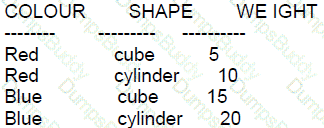
You write this query:
SELECT
FROM bricks b1 CROSS JOIN bricks b2
WHERE b1. Weight < b2. Weight:
How many rows will the query return?
Options:
1
16
10
6
4
0
Answer:
DExplanation:
A: Incorrect because the CROSS JOIN of the BRICKS table with itself will produce more than one row.
B: Incorrect because CROSS JOINing a table with four rows with itself produces 16 rows, but the WHERE condition filters these down.
C: Incorrect because while a CROSS JOIN of a table with four rows with itself produces 16 rows, this answer does not take into account the WHERE condition.
D: Correct. The CROSS JOIN will result in 16 combinations (4x4), but the WHERE condition b1.weight < b2.weight will only be true for combinations where the second weight is greater than the first. Since there are 4 distinct weights, there are (42)=6(24)=6 combinations where one weight is less than the other.
E: Incorrect because this does not account for the conditions specified in the WHERE clause.
F: Incorrect because the query will return some rows due to the condition specified.

Which two queries only return CUBE?
Options:
SELECT shape FROM bricks JOIN boxes ON weight >= min_weight AND weight < max_weight;
SELECT shape FROM bricks JOIN boxes ON weight > min_weight;
SELECT shape FROM bricks JOIN boxes ON weight BETWEEN min_weight AND max_weight;
SELECT shape FROM bricks JOIN boxes ON weight < max_weight;
SELECT shape FROM bricks JOIN boxes ON NOT (weight > max_weight);
Answer:
A, EExplanation:
Based on the table structure given in the image, to return the value 'CUBE' from the 'bricks' table when joined with 'boxes', the condition must ensure that the weight of the bricks is within the allowed weight range specified in the 'boxes' table for a 'SMALL' box size.
A. True. Since MAX_WEIGHT is 0, a comparison using >= min_weight AND weight < max_weight will only return rows where the weight is less than 0, which is impossible for actual weight values, suggesting there might be a mistake in the data provided or the comparison logic.
E. True. NOT (weight > max_weight) effectively translates to 'where weight is less than or equal to max_weight'. However, since MAX_WEIGHT is 0, this condition would only be true if the weight is not greater than 0, which can only happen if the weight is 0 or less. This seems to indicate an anomaly where either the data is incorrect, or the condition is meant to handle a case where the weight is zero or possibly a negative placeholder value.
Both B and D will potentially return more than just 'CUBE' if there are bricks with weights greater than MIN_WEIGHT. C is incorrect because BETWEEN is inclusive, and there are no weights that are both greater than or equal to MIN_WEIGHT and less than or equal to MAX_WEIGHT when MAX_WEIGHT is 0.
Which three statements are true about multiple row subqueries?
Options:
They can contain HAVING clauses.
Two or more values are always returned from the subquery.
They cannot contain subquery.
They can return multiple columns.
They can contain GROUP BY clauses.
Answer:
A, D, EExplanation:
Multiple row subqueries are subqueries that are used where a subquery is allowed, but they can return more than one row. This means they can be used with operators that allow multiple values like IN, ANY, ALL, etc.
Option A: They can contain HAVING clauses. This is true. A multiple row subquery can use aggregate functions and, therefore, can include a HAVING clause to filter the results of these aggregates. A HAVING clause is used in a similar way to a WHERE clause, except that it is used to filter rows after an aggregation is performed.
Option D: They can return multiple columns. This is true. A multiple row subquery can indeed return more than one column, which can be used in the outer query, depending on the context, such as in the column comparison subqueries.
Option E: They can contain GROUP BY clauses. This is true. Since multiple row subqueries can include aggregate functions, they can also include a GROUP BY clause to specify the grouping of data on which to apply the aggregate functions.
Regarding the incorrect options:
Option B: Two or more values are always returned from the subquery. This is false. Multiple row subqueries have the potential to return multiple rows, but they are not required to do so. They could return zero, one, or multiple rows depending on the data and the specific query.
Option C: They cannot contain subquery. This is false. Multiple row subqueries can contain other subqueries within them, which are known as nested subqueries.
For further reading and verification of these points, one can refer to the Oracle Database SQL Language Reference 12c, specifically the sections on subquery syntax and semantics, which discuss the use of HAVING, GROUP BY, and the ability of subqueries to return multiple rows or columns.
which is true about the round,truncate and mod functions>?
Options:
ROUND(MOD(25,3),-1) IS INVALID
ROUND(MOD(25,3),-1) AND TRUNC(MOD(25,3),-1) ARE BOTH VALID AND GIVE THE SAME RESULT.
ROUND(MOD(25,3),-1) AND TRUNC(MOD(25,3),-1) ARE BOTH VALID AND GIVE THE DIFFERENT RESULTS.
TRUNC(MOD(25,3),-1) IS INVALID.
Answer:
CExplanation:
Both ROUND and TRUNC functions can be applied to numbers, and MOD is a function that returns the remainder of a division. The ROUND function rounds a number to a specified number of decimal places, which can be positive, zero, or negative. The TRUNC function truncates a number to a specified number of decimal places.
ROUND(MOD(25,3),-1) rounds the result of MOD(25,3), which is 1, to tens place, which results in 0. TRUNC(MOD(25,3),-1) truncates the result of MOD(25,3), which is 1, to tens place, which also results in 0.
Both are valid, but in this specific case, they give the same result because the remainder (1) when rounded or truncated to tens place (-1) will be 0.
Which three queries use valid expressions?
Options:
SELECT product_id,(unit_price * 0.15 / (4.75 + 552.25)) FROM products;
SELECT product_id,(expiry_date - delivery_date) * 2 FROM products;
SELECT product_id,unit_price || 5 "Discount" , unit_price + surcharge - discount FROM products;
SELECT product_id, expiry_date * 2 from products;
SELECT product_id,unit_price,5 "Discount", unit_price + surcharge-discount FROM products;
SELECT product_id, unit_price, unit_price + surcharge FROM products;
Answer:
A, B, FExplanation:
When evaluating whether expressions in SQL queries are valid, consider data type compatibility and the operations performed:
Option A: Valid. The expression performs arithmetic operations (multiplication and division) on numeric data types (unit_price, constants). These operations are allowed and make sense in a mathematical context.
Option B: Valid. This query calculates the difference between two dates (expiry_date and delivery_date), which results in a numeric value representing the number of days between the dates. The result is then multiplied by 2, which is a valid operation on a numeric result.
Option C: Invalid. The expression unit_price || 5 attempts to concatenate a numeric value with a number, which is not valid without explicit conversion to a string. Moreover, the use of quotes around "Discount" is syntactically incorrect in this context.
Option D: Invalid. The expression expiry_date * 2 attempts to multiply a DATE datatype by a numeric value, which is not a valid operation.
Option E: Invalid. Similar to Option C, it incorrectly attempts to concatenate a number directly with a numeric value without conversion. Additionally, the aliasing with quotes is incorrectly placed.
Option F: Valid. This query simply adds two numeric columns (unit_price and surcharge), which is a valid and commonly used arithmetic operation in SQL.
Examine these statements:
CREATE TABLE dept (
deptno NUMBER PRIMARY KEY,
diname VARCHAR2(10) ,
mgr NUMBER ,
CONSTRAINT dept_fkey FOREIGN KEY(mgr) REFERENCES emp (empno));
CREATE TABLE emp (
Empno NUMBER PRIMARY KEY,
Ename VARCHAR2 (10) ,
deptno NUMBER,
CONSTRAINT emp_fkey FOREIGN KEY (deptno) REFERENCES dept (deptno) DISABLE);
ALTER TABLE emp MODIFY CONSTRAINT emp_fkey ENABLE;
Which two are true?
Options:
The MGR column in the DEPT table will not be able to contain NULL values.
The CREATE TABLE EMP statement must precede the CREATE TABLE DEPT statement for all threestatements to execute successfully.
Both foreign key constraint definitions must be removed from the CREATE TABLE statements, andbe added with ALTER TABLE statements once both tables are created, for the two CREATE TABLEstatements to
execute successfully in the order shown.
The DEFT FKEY constraint definition must be removed from the CREATE TABLE DEF statement.and be added with an AITER TABLE statement once both tables are created, for the two CREATE TABLE statements
to execute successfully in the order shown.
The Deptno column in the emp table will be able to contain nulls values.
All three statements execute successfully in the order shown
Answer:
E, FExplanation:
E. True. The deptno column in the emp table can contain null values unless explicitly constrained not to, which is not the case here.
F. True. The three statements can execute successfully in the order shown. The foreign key constraint in the dept table is referring to the emp table which does not yet exist, but this is not a problem because it is not immediately enabled. The emp table is created next with a disabled foreign key constraint referencing the already created dept table. Finally, the foreign key constraint on emp is enabled after both tables are in place.
A is incorrect because the MGR column can contain NULL values as there is no NOT NULL constraint applied to it. B is incorrect because the CREATE TABLE EMP statement contains a disabled foreign key, so it can be created before CREATE TABLE DEPT. C and D are incorrect because foreign key constraints do not need to be removed and added later for the tables to be created successfully; they can be managed as shown in the provided statements.
Which two statements are true about INTERVAL data types
Options:
INTERVAL YEAR TO MONTH columns only support monthly intervals within a range of years.
The value in an INTERVAL DAY TO SECOND column can be copied into an INTERVAL YEAR TO MONTH column.
INTERVAL YEAR TO MONTH columns only support monthly intervals within a single year.
The YEAR field in an INTERVAL YEAR TO MONTH column must be a positive value.
INTERVAL DAY TO SECOND columns support fractions of seconds.
INTERVAL YEAR TO MONTH columns support yearly intervals.
Answer:
A, EExplanation:
Regarding INTERVAL data types in Oracle Database 12c:
A. INTERVAL YEAR TO MONTH columns only support monthly intervals within a range of years. This is true. The INTERVAL YEAR TO MONTH data type stores a period of time using years and months.
E. INTERVAL DAY TO SECOND columns support fractions of seconds. This is true. The INTERVAL DAY TO SECOND data type can store days, hours, minutes, seconds, and fractional seconds.
Options B, C, D, and F are incorrect:
B is incorrect because data types between INTERVAL DAY TO SECOND and INTERVAL YEAR TO MONTH are not compatible.
C is incorrect as it incorrectly limits INTERVAL YEAR TO MONTH to a single year.
D is incorrect; the YEAR field can be negative to represent a past interval.
F is incorrect as INTERVAL YEAR TO MONTH supports intervals that can span multiple years, not just annual increments.
Examine the description of the CUSTOMERS table:
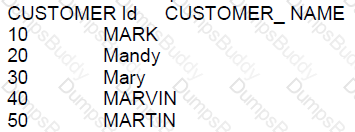
Which two SELECT statements will return these results:
CUSTOMER_ NAME
--------------------
Mandy
Mary
Options:
SELECT customer_ name FROM customers WHERE customer_ name LIKE ' % a % ’ ;
SELECT customer_ name FROM customers WHERE customer name LIKE 'Ma%' ;
SELECT customer_ name FROM customers WHERE customer_ name='*Ma*';
SELECT customer_ name FROM customers WHERE UPPER (customer_ name ) LIKE 'MA*. ;
SELECT customer_ name FROM customers WHERE customer name LIKE 'Ma*';
SELECT customer_ name FROM customers WHERE UPPER (customer name) LIKE 'MA&';
SELECT customer_ name FROM customers WHERE customer_ name KIKE .*Ma*';
Answer:
B, DExplanation:
The SQL LIKE operator is used in a WHERE clause to search for a specified pattern in a column. Here are the evaluations of the options:
A: The pattern ' % a % ’ will match any customer names that contain the letter 'a' anywhere in the name, not necessarily those starting with 'Ma'.
B: This is correct as 'Ma%' will match any customer names that start with 'Ma'.
C: In SQL, the wildcard character is '%' not '*', therefore, the pattern 'Ma' is incorrect.
D: This is the correct syntax. 'UPPER (customer_ name ) LIKE 'MA%'' will match customer names starting with 'Ma' in a case-insensitive manner.
E: Again, '*' is not a valid wildcard character in SQL.
F: The character '&' is not a wildcard in SQL.
G: The operator 'KIKE' is a typo, and '.Ma' is not valid SQL pattern syntax.
The CUSTOMERS table has a CUST_CREDT_LIMIT column of data type number.
Which two queries execute successfully?
Options:
SELECT TO_CHAR(NVL(cust_credit_limit * .15,'Not Available')) FROM customers;
SELECT NVL2(cust_credit_limit * .15,'Not Available') FROM customers;
SELECT NVL(cust_credit_limit * .15,'Not Available') FROM customers;
SLECT NVL(TO_CHAR(cust_credit_limit * .15),'Not available') from customers;
SELECT NVL2(cust_credit_limit,TO_CHAR(cust_credit_limit * .15),'NOT Available') FROM customers;
Answer:
A, EExplanation:
A. True - The TO_CHAR function is used correctly here to convert the numeric value to a string, and NVL handles the case where cust_credit_limit might be NULL. The expression inside NVL computes 15% of the credit limit or displays 'Not Available' if the credit limit is NULL. The syntax is correct.
B. False - The NVL2 function requires three parameters: the expression to check for NULL, the value to return if it's not NULL, and the value to return if it is NULL. The given usage lacks the required parameters and syntax.
C. False - The NVL function expects both parameters to be of the same data type. Since the second parameter 'Not Available' is a string, it causes a data type conflict with the numerical result of the first parameter.
D. False - The keyword SELECT is misspelled as SLECT, making the syntax incorrect.
E. True - This query uses NVL2 correctly by checking if cust_credit_limit is not NULL, then applying TO_CHAR to compute 15% of it and converting it to string, or returning 'NOT Available' if it is NULL. The syntax and function usage are correct.
Which statement fails to execute successfully?
A)
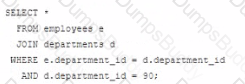
B)
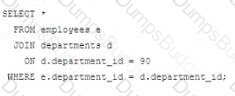
C)
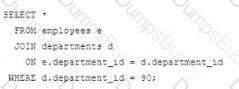
D)
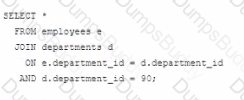
Options:
Option A
Option B
Option C
Option D
Answer:
BExplanation:
In Oracle SQL, when performing a JOIN operation, the ON clause is used to specify the condition that relates the two tables being joined. The WHERE clause can be used to further filter the result set.
A) This is a valid join condition using the WHERE clause to filter the rows after the join has been made.
B) This statement will fail because the ON clause should only contain conditions that relate the two tables. The condition for filtering the departments table should be in the WHERE clause, not in the ON clause. This is a common mistake when writing JOIN statements.
C) This is a correct statement. The ON clause specifies how the tables are related and the WHERE clause specifies an additional filtering condition for the query.
D) This statement is also correct. It's similar to the first statement (A) and properly places the department_id filter in the ON clause, which is acceptable though not typically best practice as it can be less readable than using a WHERE clause for non-join conditions.
When the JOIN operation is executed, the database first pairs rows from the joined tables that meet the join condition specified by the ON clause. Then, it filters the result of the JOIN operation based on the condition specified in the WHERE clause.
References:
Oracle Documentation on Joins: https://docs.oracle.com/database/121/SQLRF/queries006.htm#SQLRF52359
Examine this description of the PRODUCTS table:
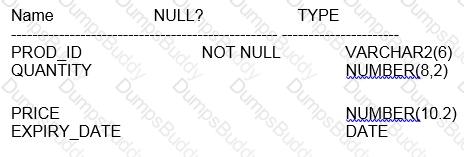
Rows exist in this table with data in all the columns. You put the PRODUCTS table in read-only mode. Which three commands execute successfully on PRODUCTS?
Options:
ALTER TAELE products DROP COLUMN expiry_date;
CREATE INDEX price_idx on products (price);
ALTER TABLE products SET UNUSED(expiry_date);
TRUNCATE TABLE products;
ALTER TABLE products DROP UNUSED COLUMNS
DROP TABLE products
Answer:
B, E, FExplanation:
B. CREATE INDEX price_idx on products (price); E. ALTER TABLE products DROP UNUSED COLUMNS; F. DROP TABLE products.
Comprehensive and Detailed Explanation WITH all References:
When a table is in read-only mode, most types of modifications are prohibited. However, certain operations can still be performed.
A. Incorrect. You cannot drop a column from a table that is in read-only mode, as it is a modifying operation. B. Correct. You can create an index on a read-only table. Creating an index does not modify the actual rows within the table; it builds a separate structure used for faster access. C. Incorrect. The SET UNUSED statement marks one or more columns as unused so they can be dropped when the database is not busy. This operation is considered a modifying operation and therefore is not allowed on a read-only table. D. Incorrect. Truncate is a DDL operation that would delete all rows from a table. This operation is not allowed on a read-only table. E. Correct. The ALTER TABLE ... DROP UNUSED COLUMNS statement is used to drop columns that have been previously marked as unused using the SET UNUSED statement. This operation is allowed because it only affects previously marked unused columns, not actively used data. F. Correct. Dropping a table is allowed even if it's in read-only mode because it is a DDL operation that does not operate on the rows of the table but rather on the object itself.
The behavior of read-only tables and the operations that can be performed on them are detailed in the Oracle Database SQL Language Reference and Oracle Database Administrator's Guide.
Which two are true about the data dictionary?
Options:
Base tables in the data dictionary have the prefix DBA_.
All user actions are recorded in the data dictionary.
The data dictionary is constantly updated to reflect changes to database objects, permissions, and data.
All users have permissions to access all information in the data dictionary by default
The SYS user owns all base tables and user-accessible views in the data dictionary.
Answer:
C, EExplanation:
C. True, the data dictionary is constantly updated to reflect changes to the metadata of the database objects, permissions, and structures, among other things.E. True, the SYS user owns all base tables in the data dictionary. These base tables underlie all data dictionary views that are accessible by the users.
A, B, and D are not correct because: A. Base tables do not necessarily have the prefix DBA_; instead, DBA_ is a prefix for administrative views that are accessible to users with DBA privileges. B. The data dictionary records metadata about the actions, not the actions themselves. D. Not all users have access to all information in the data dictionary. Access is controlled by privileges.
References:
Oracle documentation on data dictionary and dynamic performance views: Oracle Database Reference
Understanding the Oracle data dictionary: Oracle Database Concepts
View the Exhibit and examine the structure of the ORDERS table.
The columns ORDER_MODE and ORDER TOTAL have the default values'direct “and respectively.
Which two INSERT statements are valid? (Choose two.)
Options:
INSERT INTO (SELECT order_id, order date, customer_id FROM orders) VALUES (1, ‘09-mar-2007“,101);
INSERT INTO orders (order_id, order_date, order mode,customer_id, order_total) VALUES (1, TO_DATE (NULL),‘online‘,101, NULL) ;
INSERT INTO orders VALUES (1, ‘09-mar-2007’, ‘online’,’ ’,1000);
INSERT INTO orders (order id, order_date, order mode, order_total)VALUES (1,‘10-mar-2007’,’online’, 1000)
INSERT INTO orders VALUES(‘09-mar-2007’,DEFAULT,101, DEFALLT);
Answer:
B, DExplanation:
Regarding valid INSERT statements into the ORDERS table:
B. This is a valid statement because it uses TO_DATE for potentially setting a NULL date and provides defaults implicitly where not specified, adhering to the column constraints and requirements.
D. This statement is correctly formatted and provides values for non-optional fields, using DEFAULT implicitly for unspecified optional fields.
Incorrect options:
A: The subquery format and values provided do not match the expected column count and types for direct insert.
C: Incorrect format due to an improper string for the ORDER_MODE and possibly incomplete values.
E: Incorrect syntax; DEFAULT should be correctly capitalized, and the value order and type must match the table structure.
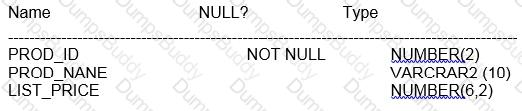
Examine the description of the PRODUCT_INFORMATION table:
Options:
SELECT (COUNT(list_price) FROM Product_intormation WHERE list_price=NULL;
SELECT count(nvl( list_price,0)) FROM product_information WHERE list_price is null;
SELECT COUNT(DISTINCT list_price) FROM product_information WHERE list_price is null.
BELECT COUNT(list_price) FROM product_information where list_price is NULL;
Answer:
BExplanation:
In SQL, when you want to count occurrences of null values using the COUNT function, you must remember that COUNT ignores null values. So, if you want to count rows with null list_price, you have to replace nulls with some value that can be counted. This is what the NVL function does. It replaces a null value with a specified value, in this case, 0.
A, C, and D options attempt to count list_price directly where it is null, but this will always result in a count of zero because COUNT does not count nulls. Option B correctly uses the NVL function to convert null list_price values to 0, which can then be counted. The WHERE list_price IS NULL clause ensures that only rows with null list_price are considered.
The SQL documentation confirms that COUNT does not include nulls in its count and NVL is used to substitute a value for nulls in an expression. So option B will give us the correct count of rows with a null list_price.
Which three are true about the CREATE TABLE command?
Options:
It can include the CREATE...INDEX statement for creating an index to enforce the primary key constraint.
The owner of the table should have space quota available on the tablespace where the table is defined.
It implicitly executes a commit.
It implicitly rolls back any pending transactions.
A user must have the CREATE ANY TABLE privilege to create tables.
The owner of the table must have the UNLIMITED TABLESPACE system privilege.
Answer:
B, C, EExplanation:
A. False - The CREATE TABLE command cannot include a CREATE INDEX statement within it. Indexes to enforce constraints like primary keys are generally created automatically when the constraint is defined, or they must be created separately using the CREATE INDEX command.
B. True - The owner of the table needs to have enough space quota on the tablespace where the table is going to be created, unless they have the UNLIMITED TABLESPACE privilege. This ensures that the database can allocate the necessary space for the table. Reference: Oracle Database SQL Language Reference, 12c Release 1 (12.1).
C. True - The CREATE TABLE command implicitly commits the current transaction before it executes. This behavior ensures that table creation does not interfere with transactional consistency. Reference: Oracle Database SQL Language Reference, 12c Release 1 (12.1).
D. False - It does not implicitly roll back any pending transactions; rather, it commits them.
E. True - A user must have the CREATE ANY TABLE privilege to create tables in any schema other than their own. To create tables in their own schema, they need the CREATE TABLE privilege. Reference: Oracle Database Security Guide, 12c Release 1 (12.1).
F. False - While the UNLIMITED TABLESPACE privilege allows storing data without quota restrictions on any tablespace, it is not a mandatory requirement for a table owner. Owners can create tables as long as they have sufficient quotas on the specific tablespaces.
.No user-defined locks are used in your database.
Which three are true about Transaction Control Language (TCL)?
Options:
COMMIT erases all the transaction’s savepoints and releases its locks.
COMMIT ends the transaction and makes all its changes permanent.
ROLLBACK without the TO SAVEPOINT clause undoes all the transaction's changes but does not release its locks.
ROLLBACK to SAVEPOTNT undoes the transaction's changes made since the named savepoint and then ends the transaction.
ROLLBACK without the TO SAVEPOINT clause undoes alt the transaction's changes, releases its locks, and erases all its savepoints.
ROLLBACK without the TO SAVEPOINT clause undoes all the transaction's changes but does not erase its savepoints.
Answer:
A, B, EExplanation:
For Transaction Control Language (TCL) operations:
A. COMMIT erases all the transaction’s savepoints and releases its locks: When a COMMIT operation is executed, it finalizes all changes made during the transaction, removes any savepoints that have been set during the transaction, and releases any locks held on the database objects by the transaction.
B. COMMIT ends the transaction and makes all its changes permanent: A COMMIT command completes the transaction, making all data modifications permanent and visible to other sessions.
E. ROLLBACK without the TO SAVEPOINT clause undoes all the transaction's changes, releases its locks, and erases all its savepoints: The ROLLBACK command, when used without specifying a SAVEPOINT, undoes all changes made during the transaction, releases any locks held, and removes any savepoints that were established during the transaction.
Incorrect options:
C: ROLLBACK, without any specification, not only undoes all the transaction's changes but also releases all locks held by the transaction.
D: ROLLBACK to a SAVEPOINT only undoes changes up to the named savepoint and does not end the transaction; the transaction continues until a COMMIT or a full ROLLBACK is issued.
F: ROLLBACK without a TO SAVEPOINT clause also erases all savepoints created during the transaction.
Which two statements are true about the order by clause when used with a sql statement containing a set operator such as union?
Options:
column positions must be used in the order by clause.
The first column in the first select of the compound query with the union operator is used by default to sort output in the absence of an order by clause.
Each select statement in the compound query must have its own order by clause.
only column names from the first select statement in the compound query are recognized.
Each select statement in the compound query can have its own order by clause.
Answer:
A, DExplanation:
A. True, when using the ORDER BY clause with set operators like UNION, you can refer to the results by column positions. This allows for consistent sorting behavior across potentially heterogeneous SELECT statements.D. True, only the column names or positions from the first SELECT statement are recognized in the ORDER BY clause when used with set operators like UNION, as the result set is treated as if it originated from the first SELECT structure.
References:
Oracle documentation on ORDER BY with set operators: Oracle Database SQL Language Reference
Explanation of ORDER BY usage: Oracle SQL Tips
Top of Form
Which two are true about the NVL, NVL2, and COALESCE functions?
Options:
The first expression in NVL2 is never returned.
NVL2 can have any number of expressions in the list.
COALESCE stops evaluating the list of expressions when it finds the first null value.
COALESCE stops evaluating the list of expressions when it finds the first non-null value.
NVL must have expressions of the same data type.
NVL can have any number of expressions in the list.
Answer:
D, EExplanation:
A. This statement is false. In NVL2, the first expression is returned if it is not null.
B. This statement is false. NVL2 takes exactly three arguments, not any number of expressions.
C. This statement is false. COALESCE stops evaluating its list of expressions as soon as it finds the first non-null value.
D. This is true. COALESCE returns the first non-null expression in its list.
E. This statement is true. NVL requires the first and second expressions to be of the same or compatible data types because it returns the first expression if it is not null, otherwise it returns the second.
F. This statement is false. NVL takes exactly two arguments, not any number.
References:
Oracle Documentation on COALESCE: https://docs.oracle.com/database/121/SQLRF/functions040.htm#SQLRF00625
Oracle Documentation on NVL: https://docs.oracle.com/database/121/SQLRF/functions130.htm#SQLRF00683
Oracle Documentation on NVL2: https://docs.oracle.com/database/121/SQLRF/functions123.htm#SQLRF00682
Which statement is true regarding the SESSION_PRIVS dictionary view?
Options:
It contains the object privileges granted to other users by the current user session.
It contains the system privileges granted to other users by the current User session.
It contains the current system privileges available in the user session.
It contains the current object privileges available in the user session.
Answer:
CExplanation:
Regarding the SESSION_PRIVS dictionary view:
C. It contains the current system privileges available in the user session: This view displays the system privileges granted to the current user, making it a tool for understanding which actions the user is allowed to perform in the current session.
Incorrect options:
A and B: SESSION_PRIVS does not contain information about privileges granted to or by other users; it specifically lists the privileges available to the current session.
D: It does not contain object privileges; these are contained in other views such as USER_TAB_PRIVS.
Which three statements are true about built-in data types?
Options:
A VARCHAR2 blank-pads column values only if the data stored is non-numeric and contains no special characters.
The default length for a CHAR column is always one character.
A VARCHAR2 column definition does not require the length to be specified.
A BLOB stores unstructured binary data within the database.
A CHAR column definition does not require the length to be specified.
A BFILE stores unstructured binary data in operating system files.
Answer:
D, FExplanation:
D: True. A BLOB (Binary Large Object) is used to store unstructured binary data within the Oracle Database. It can hold a variable amount of data.
F: True. A BFILE is a datatype in Oracle SQL used to store a locator (pointer) that points to binary data stored in operating system files outside of the Oracle Database.
Both BLOB and BFILE are used for large binary data but differ in where the data is actually stored - BLOB stores the data inside the Oracle Database, whereas BFILE stores the data in the file system outside the database.
References:The Oracle Database SQL Language Reference guide details the characteristics and uses of BLOB and BFILE datatypes among others, describing their storage characteristics and data type definitions.
Which two are true about scalar subquery expressions?
Options:
You cannot correlate them with a table in the parent statement
You can use them as a default value for a column.
.You must enclose them in parentheses.
They can return at most one row.
They can return two columns.
Answer:
C, DExplanation:
Scalar subquery expressions in Oracle SQL have specific rules:
Option C: You must enclose them in parentheses.
Scalar subqueries must be enclosed in parentheses. This is a requirement for syntax clarity and to distinguish the subquery from the rest of the SQL statement.
Option D: They can return at most one row.
Scalar subqueries are designed to return exactly one row containing one column. If a scalar subquery returns more than one row, Oracle will throw an error, ensuring that the subquery either returns a single value or no value (NULL).
Options A, B, and E are incorrect based on Oracle SQL functionalities:
Option A is incorrect because scalar subqueries can indeed be correlated with the parent query.
Option B is true but not in the context of default constraints for table columns in the CREATE TABLE statement.
Option E is incorrect because scalar subqueries can only return a single column by definition.
Which two statements are true about a self join?
Options:
The join key column must have an index.
It can be a left outer join.
It must be a full outer join.
It can be an inner join.
It must be an equijoin.
Answer:
B, DExplanation:
A self join is a regular join, but the table is joined with itself. This kind of join can take the form of an inner join, a left outer join, or even a full outer join depending on the requirement.
A. The join key column must have an index. (Incorrect)
While indexes can improve the performance of joins by reducing the cost of the lookup operations, they are not a requirement for a self join. A self join can be performed with or without an index on the join key columns.
B. It can be a left outer join. (Correct)
A self join can indeed be a left outer join. This is useful when you want to include all records from the 'left' side of the join (the table itself), even if the join condition does not find any matching record on the 'right' side (the table itself again).
Examine this statement:
SELECT1 AS id,‘ John’ AS first_name, NULL AS commission FROM dual
INTERSECT
SELECT 1,’John’ null FROM dual ORDER BY 3;
What is returned upon execution?[
Options:
2 rows
0 rows
An error
1 ROW
Answer:
DExplanation:
Regarding the provided SQL INTERSECT query:
D. 1 ROW: The INTERSECT operation will compare the two SELECT statements and return rows that are identical between them. Both queries are designed to return the same values ('1' for the ID, 'John' for the name, and NULL for the commission), hence one row that is identical between the two datasets will be returned.
Incorrect options:
A: Only one identical row exists between the two datasets.
B: There is an identical row; thus, it is not zero.
C: There is no error in the syntax or execution of the query.
Which three statements are true about single row functions?
Options:
They can be used only in the where clause of a select statement.
They can accept only one argument.
They return a single result row per table.
The argument can be a column name, variable, literal or an expression.
They can be nested to any level.
The date type returned can be different from the data type of the argument.
Answer:
D, E, FExplanation:
Single-row functions in SQL operate on each row independently and can modify the returned value:
Option A: Incorrect. Single row functions can be used in multiple parts of a SELECT statement, including SELECT, WHERE, and ORDER BY clauses.
Option B: Incorrect. Single row functions can accept more than one argument, such as the CONCAT function, which can accept multiple string arguments.
Option C: Incorrect. They return one result for each row processed, not per table.
Option D: Correct. Single row functions can take various types of arguments including column names, literals, variables, and other expressions.
Option E: Correct. Functions can be nested within other functions, allowing complex expressions and calculations.
Option F: Correct. The data type of the result can differ from the arguments’ data types, such as the SUBSTR function returning a VARCHAR2 even when used on a number after converting it to a string.
Examine this description of the EMP table:
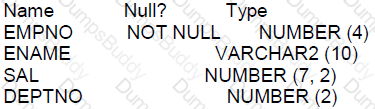
You execute this query:
SELECT deptno AS "departments", SUM (sal) AS "salary"
FROM emp
GROUP | BY 1
HAVING SUM (sal)> 3 000;
What is the result?
Options:
only departments where the total salary is greater than 3000, returned in no particular order
all departments and a sum of the salaries of employees with a salary greater than 3000
an error
only departments where the total salary is greater than 3000, ordered by department
Answer:
CExplanation:
The query uses the syntax GROUP | BY 1 which is not correct. The pipe symbol | is not a valid character in the context of the GROUP BY clause. Additionally, when using GROUP BY with a number, it refers to the position of the column in the SELECT list, which should be written without a pipe symbol and correctly as GROUP BY 1. Since the syntax is incorrect, the database engine will return an error.
Which two queries return the string Hello! we're ready?
Options:
SELECT q'! Hello! We're ready! 'FROM DUAL;
SELECT "Hello! We're ready "FROM |DUAL;
SELECT q'[Hello! We're ready]'FROM DUAL;
SELECT 'Hello! we\ re ready' ESCAPE'N'FROMDUAL:
SELECT 'Hello! We're ready' FROM DUAL;
Answer:
A, CExplanation:
In Oracle SQL, the q quote operator can be used to define string literals that contain single quotes or other special characters without needing to escape them. The queries using the q quote mechanism, like in options A and C, will successfully return the string as it is, including single quotes within the string.
A: Correct, it uses the q quote operator with the exclamation mark ! as the delimiter, which allows the string to contain single quotes.
B: Incorrect, double quotes " in Oracle SQL are used for identifiers such as column names, not string literals.
C: Correct, this also uses the q quote operator, with the square brackets [] as the delimiters.
D: Incorrect, the backslash \ is not used as an escape character in Oracle SQL string literals, and the ESCAPE keyword is used incorrectly here.
E: Incorrect, this does not account for the single quote within the string, which would terminate the string literal prematurely, and it lacks the q quote operator or proper escape mechanism.
Which three privileges can be restricted to a subset of columns in a table?
Options:
ALTER
REFERENCES
UPDATE
SELECT
INDEX
INSERT
DELETE
Answer:
B, C, FExplanation:
B: True. The REFERENCES privilege can be granted on specific columns within a table. This is necessary when a user needs to define foreign key constraints that reference those particular columns.
C: True. The UPDATE privilege can be granted on specific columns, allowing users to update only designated columns within a table. This is useful for restricting write access to sensitive or critical data within a table.
F: True. The INSERT privilege can also be granted on specific columns, meaning a user can be permitted to insert data into only certain columns of a table. This helps in maintaining data integrity and controlling access to data fields based on user roles.
Examine the description of the PROMTIONS table:
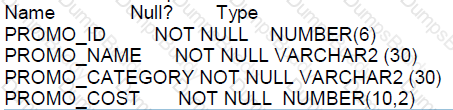
You want to display the unique promotion costs in each promotion category.
Which two queries can be used?
Options:
SELECT promo_cost, | pxomo_category FROM promotions ORDER BY 1;
SELECT promo_category, DISTINCT promo_cost PROM promotions ORDER BY 2:
SELECT DISTINCT promo_category ||'has’|| promo_cost AS COSTS FROM promotions ORDER BY 1;
SELECT DISTINCT promo_category, promo_cost FROM promotions ORDER BY 1;
SELECT DISTINCT promo_cost ||' in' II DISTINCT promo_category FROM promotions ORDER BY 1;
Answer:
C, DExplanation:
To display unique promotion costs in each promotion category, the correct queries that can be used are:
C. SELECT DISTINCT promo_category ||' has '|| promo_cost AS COSTS FROM promotions ORDER BY 1;This query concatenates the promo_category with the literal ' has ' and promo_cost, giving a unique string for each combination of promo_category and promo_cost, which is what we are interested in when we want to list unique costs per category.
D. SELECT DISTINCT promo_category, promo_cost FROM promotions ORDER BY 1;This query selects distinct combinations of promo_category and promo_cost, which is exactly what's required to display unique promotion costs in each category.
Options A, B, and E are incorrect:
A is incorrect because it does not use the DISTINCT keyword to ensure uniqueness.
B has incorrect syntax; the DISTINCT keyword should appear directly after SELECT and applies to all columns, not just one.
E is syntactically incorrect and would not execute because the DISTINCT keyword is not used correctly. It should not appear twice in the SELECT clause.
In the PROMOTIONS table, the PROMO_BEGTN_DATE column is of data type DATE and the default date format is DD-MON-RR.
Which two statements are true about expressions using PROMO_BEGIN_DATE contained in a query?
Options:
TO_NUMBER(PROMO_BEGIN_DATE)-5 will return number
TO_DATE(PROMO_BEGIN_DATE * 5) will return a date
PROMO_BEGIN_DATE-SYSDATE will return a number.
PROMO_BEGIN_DATE-5 will return a date.
PROMO_BEGIN_DATE-SYSDATE will return an error.
Answer:
C, DExplanation:
A. This statement is incorrect because TO_NUMBER expects a character string as an argument, not a date. Directly converting a date to a number without an intermediate conversion to a character string would result in an error. B. This statement is incorrect. Multiplying a date by a number does not make sense in SQL, and attempting to convert such an expression to a date will also result in an error. C. This statement is correct. Subtracting two dates in Oracle SQL results in the number of days between those dates, hence the result is a number. D. This statement is correct. Subtracting a number from a date in Oracle SQL will subtract that number of days from the date, returning another date. E. This statement is incorrect. As stated in C, subtracting a date from SYSDATE correctly returns the number of days between those two dates, not an error.
These concepts are explained in the Oracle Database SQL Language Reference, which details date arithmetic in SQL.
Which two statements are true about conditional INSERT ALL?
Options:
Each row returned by the subquery can be inserted into only a single target table.
It cannot have an ELSE clause.
The total number of rows inserted is always equal to the number of rows returned by the subquery
A single WHEN condition can be used for multiple INTO clauses.
Each WHEN condition is tested for each row returned by the subquery.
Answer:
D, EExplanation:
For conditional INSERT ALL in Oracle Database 12c:
D. A single WHEN condition can be used for multiple INTO clauses. This is true. A single WHEN condition in a multi-table insert can direct the insertion of a single row source into multiple target tables.
E. Each WHEN condition is tested for each row returned by the subquery. True, each row from the subquery is evaluated against each WHEN condition to determine into which table(s) the row should be inserted.
Options A, B, and C are incorrect:
A is incorrect because a row can indeed be directed into multiple tables based on the conditions.
B is incorrect as INSERT ALL can include an ELSE clause to handle rows that do not meet any of the specified conditions.
C is incorrect because not every row from the subquery necessarily results in a row insertion; it depends on the conditions being met.
Which three are true about scalar subquery expressions?
Options:
A scalar subquery expression that returns zero rows evaluates to zoro
They cannot be used in the values clause of an insert statement*
They can be nested.
A scalar subquery expression that returns zero rows evaluates to null.
They cannot be used in group by clauses.
They can be used as default values for columns in a create table statement.
Answer:
C, D, FExplanation:
Scalar subquery expressions are used in Oracle SQL to return a single value from a subquery.
Option C: They can be nested.
Scalar subqueries can indeed be nested within another scalar subquery, provided each subquery returns a single value.
Option D: A scalar subquery expression that returns zero rows evaluates to null.
According to Oracle documentation, if a scalar subquery returns no rows, the result is a NULL value, not zero or any other default.
Option F: They can be used as default values for columns in a create table statement.
Scalar subqueries can be specified in the DEFAULT clause of a column in a CREATE TABLE statement to dynamically assign default values based on the result of the subquery.
Options A, B, and E are incorrect based on Oracle SQL standards and functionalities.
Examine the description of the CUSTOMERS table:
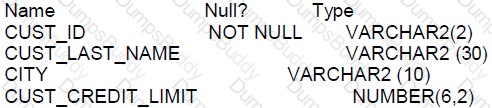
You need to display last names and credit limits of all customers whose last name starts with A or B In lower or upper case, and whose credit limit is below 1000.
Examine this partial query:
SELECT cust_last_nare, cust_credit_limit FROM customers
Which two WHERE conditions give the required result?
Options:
WHERE UPPER(cust_last_name) IN ('A%', 'B%') AND cust_credit_limit < 1000:
WHERE (INITCAP(cust_last_name) LIKE ‘A%' OR ITITCAP(cust_last_name) LIKE ‘B%') AND cust_credit_limit < 1000
WHERE UPPER(cust_last_name) BETWEEN UPPER('A%' AND 'B%’) AND ROUND(cust_credit_limit) < 1000;
WHERE (UPPER(cust_last_name) LIKE 'A%’ OR UPPER(cust_last_name) LIKE ‘B%’) AND ROUND(cust_credit_limit) < 1000;
WHERE (UPPER(cust_last_name) like INITCAP ('A') OR UPPER(cust_last_name) like INITCAP('B')) AND ROUND(cust_credit_limit) < ROUND(1000) ;
Answer:
B, DExplanation:
The SQL query must find all customers with last names starting with A or B, regardless of case, and a credit limit below 1000:
B. WHERE (INITCAP(cust_last_name) LIKE ‘A%' OR INITCAP(cust_last_name) LIKE ‘B%') AND cust_credit_limit < 1000: The INITCAP function initializes the first letter to uppercase for comparison. However, it should be noted that using INITCAP is not necessary when using the LIKE operator with a wildcard % following a single character, because it will not correctly filter all last names that start with an upper or lower case A or B.
D. WHERE (UPPER(cust_last_name) LIKE 'A%’ OR UPPER(cust_last_name) LIKE ‘B%’) AND cust_credit_limit < 1000: This correctly filters last names beginning with A or B in any case and includes only those with a credit limit below 1000. The UPPER function is used to convert cust_last_name to uppercase before comparison.
References:
Oracle Database SQL Language Reference 12c, especially sections on string functions and conditions.
Examine this SQL statement:
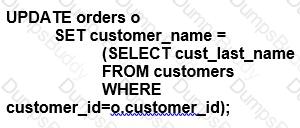
Which two are true?
Options:
The subquery is executed before the UPDATE statement is executed.
All existing rows in the ORDERS table are updated.
The subquery is executed for every updated row in the ORDERS table.
The UPDATE statement executes successfully even if the subquery selects multiple rows.
The subquery is not a correlated subquery.
Answer:
A, CExplanation:
The provided SQL statement is an update statement that involves a subquery which is correlated to the main query.
A. The subquery is executed before the UPDATE statement is executed. (Incorrect)
This statement is not accurate in the context of correlated subqueries. A correlated subquery is one where the subquery depends on values from the outer query. In this case, the subquery is executed once for each row that is potentially updated by the outer UPDATE statement because it references a column from the outer query (o.customer_id).
B. All existing rows in the ORDERS table are updated. (Incorrect)
Without a WHERE clause in the outer UPDATE statement, this would typically be true. However, the correctness of this statement depends on the actual data and presence of matching customer_id values in both tables. If there are rows in the ORDERS table with customer_id values that do not exist in the CUSTOMERS table, those rows will not be updated.
C. The subquery is executed for every updated row in the ORDERS table. (Correct)
Because the subquery is correlated (references o.customer_id from the outer query), it must be executed for each row to be updated in the ORDERS table to get the corresponding cust_last_name from the CUSTOMERS table.
Which three are true about privileges and roles?
Options:
A role is owned by the user who created it.
System privileges always set privileges for an entire database.
All roles are owned by the SYS schema.
A role can contain a combination of several privileges and roles.
A user has all object privileges for every object in their schema by default.
PUBLIC can be revoked from a user.
PUBLIC acts as a default role granted to every user in a database
Answer:
D, E, GExplanation:
Roles and privileges in Oracle manage access and capabilities within the database:
Option A: False. Roles are not "owned" in the traditional sense by the user who created them. They exist independently within the Oracle database and are assigned to users.
Option B: False. System privileges can be very granular, affecting specific types of operations or database objects, not always the entire database.
Option C: False. Roles are not owned by the SYS schema but are managed by database security and can be created by any user with sufficient privileges.
Option D: True. A role can indeed contain a combination of several privileges, including other roles, allowing for flexible and layered security configurations.
Option E: True. By default, a user has all object privileges for objects they own (i.e., objects in their schema).
Option F: False. PUBLIC is a special designation that applies to all users; individual privileges granted to PUBLIC cannot be revoked from a single user without revoking them from all users.
Option G: True. PUBLIC is a role granted by default to every user in an Oracle database, providing basic privileges necessary for general usability of the database.
Which statements is true about using functions in WHERE and HAVING?
Options:
using single-row functions in the WHERE clause requires a subquery
using single-row functions in the HAVING clause requires a subquery
using aggregate functions in the WHERE clause requires a subquery
using aggregate functions in the HAVING clause requires a subquery
Answer:
CExplanation:
Single-row functions can be used in the WHERE and HAVING clauses without requiring a subquery. However, aggregate functions, which operate on many rows to give one result per group, cannot be used in a WHERE clause unless a subquery is used because the WHERE clause is processed before the individual rows are aggregated into groups.
A. False. Single-row functions can be directly used in the WHERE clause.
B. False. Single-row functions can be directly used in the HAVING clause.
C. True. Aggregate functions cannot be used in the WHERE clause without a subquery because the WHERE clause filters individual rows before they are aggregated.
D. False. Aggregate functions are intended to be used in the HAVING clause, which is specifically for filtering groups of rows after they have been aggregated, and they do not require a subquery to be used there.
Examine the description of the PRODUCTS table:
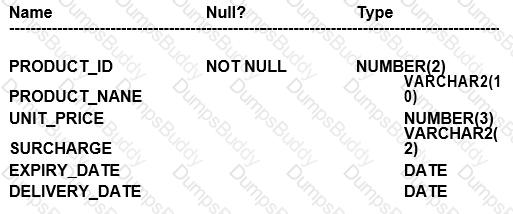
Which three queries use valid expressions?
Options:
SELECT produet_id, unit_pricer, 5 "Discount",unit_price+surcharge-discount FROM products;
SELECT product_id, (unit_price * 0.15 / (4.75 + 552.25)) FROM products;
SELECT ptoduct_id, (expiry_date-delivery_date) * 2 FROM products;
SPLECT product_id, expiry_date * 2 FROM products;
SELEGT product_id, unit_price, unit_price + surcharge FROM products;
SELECT product_id,unit_price || "Discount", unit_price + surcharge-discount FROM products;
Answer:
B, C, EExplanation:
B. SELECT product_id, (unit_price * 0.15 / (4.75 + 552.25)) FROM products; C. SELECT product_id, (expiry_date - delivery_date) * 2 FROM products; E. SELECT product_id, unit_price, unit_price + surcharge FROM products;
Comprehensive and Detailed Explanation WITH all References:
A. This is invalid because "Discount" is a string literal and cannot be used without quotes in an arithmetic operation. Also, there is a typo in unit_pricer, and 'discount' is not a defined column in the table. B. This is valid. It shows a mathematical calculation with unit_price, which is of NUMBER type. Division and multiplication are valid operations on numbers. C. This is valid. The difference between two DATE values results in the number of days between them, and multiplying this value by a number is a valid operation. D. This is invalid because expiry_date is of DATE type and cannot be multiplied by a number. Also, there's a typo: "SPLECT" should be "SELECT". E. This is valid. Both unit_price and surcharge are NUMBER types, and adding them together is a valid operation. F. This is invalid because concatenation operator || is used between a number (unit_price) and a string literal "Discount", which is not enclosed in single quotes, and 'discount' is not a defined column in the table.
In SQL, arithmetic operations on numbers and date arithmetic are valid expressions. Concatenation is also a valid expression when used correctly between string values or literals. Operations that involve date types should not include multiplication or division by numbers directly without a proper interval type in Oracle SQL.
These rules are detailed in the Oracle Database SQL Language Reference, where expressions, datatype precedence, and operations are defined.
Which two true about a sql statement using SET operations such as UNION?
Options:
The data type of each column returned by the second query must be implicitly convertible to the data type of the corresponding column returned by the first query
The data type of each column retuned by the second query must exactly match the data type of the corresponding column returned by the first query
The number, but not names, of columns must be identical for all SELECT statements in the query
The data type group of each column returned by the second query must match the data type group of the corresponding column returned by the first query
The names and number of columns must be identical for all SELECT statements in the query.
Answer:
A, CExplanation:
In the context of SQL statements using SET operations like UNION in Oracle Database 12c:
A. The data type of each column returned by the second query must be implicitly convertible to the data type of the corresponding column returned by the first query. This is correct. Oracle allows the union of columns as long as their data types are implicitly convertible, not necessarily identical.
C. The number, but not names, of columns must be identical for all SELECT statements in the query. This is correct. For a UNION operation to be valid, all SELECT statements involved must have the same number of columns, although their names and exact data types need not match.
Options B, D, and E are incorrect:
B is incorrect because exact data type matches are not required, only that they be implicitly convertible.
D is also incorrect for the same reason as B; it's enough that the types are compatible, not identical.
E is incorrect as the names
Examine the data in the ENPLOYEES table:
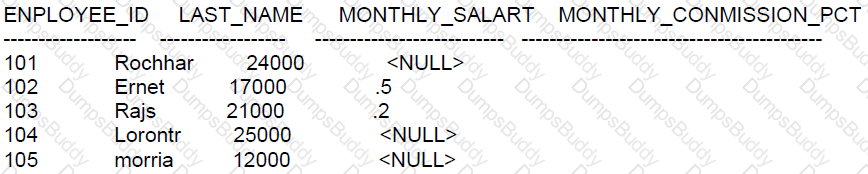
Which statement will compute the total annual compensation tor each employee?
Options:
SECECT last_namo, (menthy_salary + monthly_commission_pct) * 12 AS annual_comp
FROM employees;
SELCECT last_namo, (monthly_salary * 12) + (monthly_commission_pct * 12) AS annual_comp
FROM employees
SELCECT last_namo, (monthly_salary * 12) + (menthy_salary * 12 * NVL
(monthly_commission_pct, 0)) AS annual_comp FROM employees
SELCECT last_namo, (monthly_salary * 12) + (menthy_salary * 12 * monthly_commission_pct)
AS annual_comp FROM employees
Answer:
CExplanation:
The correct statement for computing the total annual compensation for each employee is option C. This is because the monthly commission is a percentage of the monthly salary (indicated by the column name MONTHLY_COMMISSION_PCT). To calculate the annual compensation, we need to calculate the annual salary (which is monthly_salary * 12) and add the total annual commission to it.
Here's the breakdown of the correct statement, option C:
(monthly_salary * 12) computes the total salary for the year.
NVL(monthly_commission_pct, 0) replaces NULL values in the monthly_commission_pct column with 0, ensuring that the commission is only added if it exists.
(monthly_salary * 12 * NVL(monthly_commission_pct, 0)) computes the annual commission by first determining the monthly commission (which is a percentage of the monthly salary), and then multiplying it by 12 to get the annual commission.
Finally, (monthly_salary * 12) + (monthly_salary * 12 * NVL(monthly_commission_pct, 0)) adds the annual salary and the annual commission to get the total annual compensation.
The other options are incorrect:
Option A is incorrect because it adds the monthly_commission_pct directly to the monthly_salary, which does not consider that monthly_commission_pct is a percentage.
Option B is incorrect because it adds the commission percentage directly without first applying it to the monthly salary.
Option D is incorrect because it does not handle the NULL values in the commission column, which would result in a NULL total annual compensation whenever the monthly_comission_pct is NULL.
References:
Oracle Documentation on NVL function: NVL
Oracle Documentation on Numeric Literals: Numeric Literals
Which two are true about unused columns?
Options:
The DESCRIBE command displays unused columns
A primary key column cannot be set to unused.
A query can return data from unused columns, but no DML is possible on those columns.
Once a column has been set to unused, a new column with the same name can be added to the table.
A foreign key column cannot be set to unused.
Unused columns retain their data until they are dropped
Answer:
D, FExplanation:
Unused columns are a feature in Oracle that allows a column to be marked as unused without immediately dropping it from the table structure. The key points for each option are:
A. The DESCRIBE command does not display unused columns. These columns are also not visible in user_tab_cols but are visible in user_unused_col_tabs.
B. Primary key columns can be set to unused, but you must drop the primary key constraint before doing so.
C. Once a column is marked as unused, it is not possible to query it, and Oracle will not allow DML operations on that column.
D. This is true. Once a column is set to unused, you can add a new column with the same name because Oracle essentially considers the unused column as removed from the table.
E. Just like primary key columns, a foreign key column can be marked as unused, but you must drop the foreign key constraint first.
F. This is true. Unused columns retain their data until the column is dropped using the DROP UNUSED COLUMNS command.
References:
Oracle Database SQL Language Reference, 12c Release 1 (12.1): "ALTER TABLE"
Oracle Database Administrator’s Guide, 12c Release 1 (12.1)
Which two are true about creating tables in an Oracle database?
Options:
A create table statement can specify the maximum number of rows the table will contain.
The same table name can be used for tables in different schemas.
A system privilege is required.
Creating an external table will automatically create a file using the specified directory and file name.
A primary key constraint is manadatory.
Answer:
B, CExplanation:
Regarding creating tables in an Oracle database:
B. The same table name can be used for tables in different schemas: In Oracle, a schema is essentially a namespace within the database; thus, the same table name can exist in different schemas without conflict, as each schema is distinct.
C. A system privilege is required: To create tables, a user must have the necessary system privileges, typically granted explicitly or through roles such as CREATE TABLE or administrative privileges depending on the environment setup.
Incorrect options for all three repeated questions:
A: Oracle SQL does not allow specifying the maximum number of rows directly in a CREATE TABLE statement; this is controlled by storage allocation and database design rather than table creation syntax.
D: Creating an external table does not create the physical file. It merely creates a table structure that allows access to data stored in an external file specified in the directory; the file itself must already exist or be managed outside of Oracle.
E: A primary key constraint is not mandatory for creating tables. While it is a common practice to define a primary key to enforce entity integrity, it is not required by the Oracle SQL syntax for table creation.
These answers and explanations are aligned with Oracle Database 12c SQL documentation and standard practices.
Which statements are true regarding primary and foreign key constraints and the effect they can have on table data?
Options:
A table can have only one primary key but multiple foreign keys.
It is possible for child rows that have a foreign key to remain in the child table at the time the parent row is deleted.
Primary key and foreign key constraints can be defined at both the column and table level.
Only the primary key can be defined the column and table level.
It is possible for child rows that have a foreign key to be deleted automatically from the child table at the time the parent row is deleted.
The foreign key columns and parent table primary key columns must have the same names.
A table can have only one primary key and one foreign key.
Answer:
A, C, EExplanation:
Regarding primary and foreign key constraints:
A. A table can have only one primary key but multiple foreign keys. This is true. A table is constrained to have only one primary key, which can consist of multiple columns, but can have several foreign keys referencing primary keys in other tables.
C. Primary key and foreign key constraints can be defined at both the column and table level. True. Constraints can be defined inline with the column definition or separately at the end of the table definition.
E. It is possible for child rows that have a foreign key to be deleted automatically from the child table at the time the parent row is deleted. This is also true if the foreign key is defined with the ON DELETE CASCADE option.
Options B, D, F, and G are incorrect:
B is incorrect because if a parent row is deleted, the child rows cannot remain without violating the integrity unless the foreign key is defined with ON DELETE SET NULL or similar behavior.
D is incorrect because both primary and foreign key constraints can be defined at both levels.
F is incorrect as the names of the foreign key columns do not need to match the primary key column names.
G is incorrect as a table can have multiple foreign keys.
Which three statements about roles are true?
Options:
Roles are assigned to roles using the ALTER ROLE statement.
A single user can be assigned multiple roles.
Roles are assigned to users using the ALTER USER statement.
A single role can be assigned to multiple users.
Privileges are assigned to a role using the ALTER ROLE statement.
A role is a named group of related privileges that can only be assigned to a user.
Privileges are assigned to a role using the GRANT statement.
Answer:
B, D, GExplanation:
Roles in Oracle Database are designed to simplify the management of privileges. The following statements about roles are true:
B: A single user can indeed be assigned multiple roles. This allows for easy management of user privileges as they can be grouped into roles, and these roles can be granted to users.
D: A single role can be assigned to multiple users. This is one of the primary purposes of roles, to provide an efficient way to grant the same set of privileges to different users.
G: Privileges are granted to a role using the GRANT statement. This allows the role to encapsulate the privileges which can then be granted to users.
The incorrect options are:
A: Roles cannot be assigned to other roles using the ALTER ROLE statement; they are granted to other roles using the GRANT statement.
C: Roles are not assigned to users using the ALTER USER statement; roles are granted to users using the GRANT statement.
E: Privileges are not assigned to a role using the ALTER ROLE statement; they are granted using the GRANT statement.
F: A role is not limited to being assigned to just one user; it can be assigned to multiple users.
References:
Oracle Documentation on Roles: Database Security Guide - Roles
Oracle Documentation on the GRANT statement: SQL Language Reference - GRANT
Examine the description of the EMPLOYEES table:

Which statement will execute successfully, returning distinct employees with non-null first names?
Options:
SELECT DISTINCT * FROM employees WHERE first_ name IS NOT NULL;
SELECT first_ name, DISTNCT last_ name FROM employees WHERE first_ name IS NOT NULL;
SELECT Distinct * FROM employees WHERE first_ name < > NULL;
SELECT first_ name, DISTINCT last_ name FROM employees WHERE first_ name < > NULL;
Answer:
AWhich two statements are true about Entity Relationships?
Options:
A Relationship can be mandatory for both entities
A one-to-one relationship is always a self-referencing relationship
A many-to-many relationship can be implemented only by using foreign keys
A table name can be specified just once when selecting data from a table having a selfreferencing relationship
A one-to-many relationship in one direction is a one-to-one relationship in the other direction
Answer:
AExplanation:
A relationship in an Entity-Relationship (ER) model can indeed be mandatory for both entities, meaning that an instance of one entity must relate to one and only one instance of another entity, and vice versa. This is commonly seen in a one-to-one relationship where both sides are mandatory.
Option B is incorrect; a one-to-one relationship does not have to be self-referencing. Self-referencing (or recursive) relationships occur when an entity has a relationship with itself.
Option C is incorrect; a many-to-many relationship typically requires a join table or associative entity with foreign keys that reference the primary keys of the two entities it connects.
Option D is incorrect; in the case of a self-referencing relationship, you may need to use aliases to specify the table more than once to differentiate between the self-referenced columns.
Option E is incorrect because a one-to-many relationship in one direction does not equate to a one-to-one relationship in the opposite direction.
References:
Entity-Relationship Model Concepts: ER Model
Which two statements are true regarding non equijoins?
Options:
The ON clause can be used.
The USING clause can be used.
The SQL:1999 compliant ANSI join syntax must be used.
Table aliases must be used.
The Oracle join syntax can be used.
Answer:
A, EExplanation:
Non-equi joins are joins where the join condition is based on something other than equality. In Oracle SQL, you can perform non-equi joins using various clauses:
A. The ON clause can be used: True, the ON clause can specify any condition for the join, including non-equijoins. It is not limited to equijoins.
E. The Oracle join syntax can be used: The traditional Oracle join syntax, which uses the WHERE clause to specify the join condition, can be used for all types of joins, including non-equijoins.
References:
Oracle Database SQL Language Reference 12c, especially the sections on join clauses including the ON clause and Oracle's proprietary join syntax.
Which two actions can you perform with object privileges?
Options:
Create roles.
Delete rows from tables in any schema except sys.
Set default and temporary tablespaces for a user.
Create FOREIGN KEY constraints that reference tables in other schemas.
Execute a procedure or function in another schema.
Answer:
B, EExplanation:
Regarding object privileges in an Oracle database:
B. Delete rows from tables in any schema except sys: Object privileges include DELETE on tables, which can be granted by the owner of the table or a user with adequate privileges, excluding system schemas like SYS due to their critical role.
E. Execute a procedure or function in another schema: EXECUTE is a specific object privilege that can be granted on procedures and functions, allowing users to run these objects in schemas other than their own.
Incorrect options:
A: Creation of roles is related to system privileges, not object privileges.
C: Setting default and temporary tablespaces for a user involves system-level operations, not object-level privileges.
D: Creation of foreign key constraints involves referencing rights, which, while related, are not directly granted through object privileges but need appropriate REFERENCES permission.
Which two statements are true about Oracle synonyms?
Options:
A synonym can have a synonym.
A synonym has an object number.
Any user can create a public synonym.
All private synonym names must be unique in the database.
A synonym can be created on an object in a package.
Answer:
C, EExplanation:
Oracle synonyms are used to simplify the referencing of complex schema objects:
Option A: Incorrect. A synonym cannot have another synonym; it directly references the base object.
Option B: Incorrect. A synonym does not have an object number as it is merely an alias for another object.
Option C: Correct. Any user with sufficient privileges can create a public synonym, which is accessible to all users in the database.
Option D: Incorrect. All private synonym names must be unique within a schema but not across the entire database.
Option E: Correct. Synonyms can be created for objects within packages, such as procedures or functions, simplifying the referencing of these objects without needing to specify the full package name.
Which two statements are true? (Choose two.)
Options:
The USER SYNONYMS view can provide information about private synonyms.
The user SYSTEM owns all the base tables and user-accessible views of the data dictionary.
All the dynamic performance views prefixed with V$ are accessible to all the database users.
The USER OBJECTS view can provide information about the tables and views created by the user only.
DICTIONARY is a view that contains the names of all the data dictionary views that the user can access.
Answer:
A, EExplanation:
A. The USER SYNONYMS view can provide information about private synonyms: This view contains information about private synonyms that have been created by the user. It lists all synonyms that are accessible to the user in their schema.
E. DICTIONARY is a view that contains the names of all the data dictionary views that the user can access: This view lists the names of all data dictionary views available to the user, providing a directory of useful database metadata.
Incorrect options:
B: The SYSTEM user does not own all base tables of the data dictionary; some are owned by SYS.
C: Not all users have access to dynamic performance views prefixed with V$; access is restricted based on privileges.
D: The USER_OBJECTS view lists all objects owned by the user, not just tables and views but also other types of schema objects like procedures and functions.
Examine the description of the PRODUCT_ STATUS table:

The STATUS column contains the values IN STOCK or OUT OF STocK for each row.
Which two queries will execute successfully?
Options:
SELECT prod_id ||q’(‘ s not available)’ ‘CURRENT AVAILABILITY’ FROM
product_ status WHERE status = ‘OUT OF STOCK’
SELECT prod_id ||q”‘ s not available” FROM
product_ status WHERE status = ‘OUT OF STOCK’;
SELECT PROD_ID||q’(‘s not available)’ FROM
product_ status WHERE status = ‘OUT OF STOCK’;
SELECT PROD_ID||q’(‘s not available)’ “CURRENT AVAILABILITY”
FROM product_ status WHERE status = ‘OUT OF STOCK’;
SELECT prod_id q’s not available” from product_ status WHERE status = ‘OUT OF STOCK’;
SELECT prod_id “CURRENT AVAILABILITY”||q’ (‘s not available)’ from product_ status WHERE status
= ‘OUT OF STOCK’;
Answer:
DExplanation:
The || operator is used in Oracle SQL to concatenate strings, and the q quote operator allows you to use alternative quoting mechanisms to avoid conflicts with single quotes within a string.
In options A, B, C, D, E, and F, the q-quote operator is used in different ways to define string literals.
The correct use of the q quote operator requires the format q'[...]', where [...] is the quote delimiter of your choice and can be any single character such as {, [, (, <, or others.
Option D is the correct answer because it follows the correct syntax for the q quote operator and concatenates the literal string correctly with the value of PROD_ID.
Here is the corrected syntax from option D:
SELECT PROD_ID || q'[('s not available)]' "CURRENT AVAILABILITY" FROM product_status WHERE status = 'OUT OF STOCK';
This query will execute successfully and is the only one that correctly uses the q quote operator.
Examine the data in the EMP table:
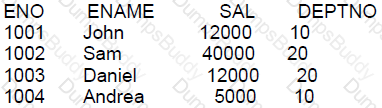
You execute this query:
SELECT deptno AS "Department", AVG(sal) AS AverageSalary, MAX(sal) AS "Max Salary"
FROM emp
WHERE sal >= 12000
GROUP BY "Department "
ORDER BY AverageSalary;
Why does an error occur?
Options:
An alias name must not be used in an ORDER BY clause.
An allas name must not contain space characters.
An alias name must not be used in a GROUP BY clause.
An alias name must always be specified in quotes.
Answer:
CExplanation:
C. True. The error occurs because the alias "Department" used in the GROUP BY clause is enclosed in double quotes, which makes it case-sensitive. However, the column deptno is not originally created with double quotes in the table definition, so you cannot refer to it with a case-sensitive alias in the GROUP BY clause. Oracle interprets "Department" as a string literal, not a column alias, in the GROUP BY clause.
A is incorrect because you can use an alias in an ORDER BY clause. B is incorrect because an alias can contain space characters if it is quoted. D is incorrect because an alias does not always have to be specified in quotes, only when it includes special characters or spaces or if it is case-sensitive.
Examine this SQL statement
DELETE FROM employees e
WHERE EXISTS
(SELECT' dummy'
FROM emp history
WHERE employee_ id= e. employee id);
Which two are true?
Options:
The subquery is not a correlated subquery.
The subquery is executed before the DELETE statement is executed.
All existing rows in the EMPLOYEES table are deleted,
The DELETE statement executes successfully even if the subquery selects multiple rows.
The subquery is executed for every row in the EMPLOYEES table.
Answer:
B, DExplanation:
For the provided DELETE statement with an EXISTS clause:
Option B: The subquery is executed before the DELETE statement is executed.
Subqueries with EXISTS are typically executed before the outer DELETE statement to determine which rows of the outer query satisfy the condition.
Option D: The DELETE statement executes successfully even if the subquery selects multiple rows.
The EXISTS condition is used to check for the existence of rows returned by the subquery, regardless of how many rows there are. It returns TRUE if the subquery returns at least one row.
Options A, C, and E are incorrect because:
Option A: This statement is incorrect; the subquery is indeed a correlated subquery because it references the employee_id from the outer query (employees).
Option C: This is incorrect because not all existing rows in the EMPLOYEES table will be deleted, only those for which an associated record exists in the emp_history table.
Option E: While technically the subquery may be evaluated multiple times, it is only executed for those rows in EMPLOYEES that satisfy the condition of the EXISTS clause.
Which three statements are true about defining relations between tables in a relational database?
Options:
Foreign key columns allow null values.
Unique key columns allow null values
Primary key columns allow null values.
Every primary or unique key value must refer to a matching foreign key value.
Every foreign key value must refer to a matching primary or unique key value.
Answer:
A, EExplanation:
A. Correct. Foreign key constraints can be nullable. This allows the possibility of a row not having a link to another table. B. Incorrect. Unique key constraints do not allow multiple rows to have null values unless the constraint is defined on multiple columns. C. Incorrect. Primary key columns must be NOT NULL and unique across the table. D. Incorrect. Primary or unique key values do not refer to foreign keys; it's the foreign keys that refer to primary or unique keys. E. Correct. Foreign key constraints enforce referential integrity by requiring that each foreign key value matches a primary or unique key value in the related table.
These are standard rules in relational databases, which can be confirmed in the Oracle Database Concepts Guide.
Which two statements are true about dropping views?
Options:
Views referencing a dropped view become invalid.
Read only views cannot be dropped.
Data selected by a view's defining query is deleted from its underlying tables when the view is dropped.
The creator of a view to be dropped must have the drop any view privilege.
CASCADE CONSTRAINTS must be specified when referential integrity constraints on other objects refer to primary or unique keys in the view to be dropped.
Answer:
A, DYou have the privileges to create any type of synonym.
Which stalement will create a synonym called EMP for the HCM.EMPLOYEE_RECORDS table that is accesible to all users?
Options:
CREATE GLOBAL SYNONYM emp FOR hcm.employee_records;
CREATE SYNONYM emp FOR hcm.employee_records;
CREATE SYNONYM PUBLIC.emp FOR hcm.employee_records;
CREATE SYNONYM SYS.emp FOR hcm.employee_records;
CREATE PUBLIC SYNONYM emp FOR hcm. employee_records;
Answer:
EExplanation:
Synonyms in Oracle are aliases for database objects that can simplify SQL statements for database users.
A. The term "GLOBAL" is not used in the creation of synonyms in Oracle.
B. The statement without the keyword PUBLIC will create a private synonym that is only accessible to the user creating the synonym, not all users.
C. The correct syntax does not include PUBLIC as a prefix to the synonym name itself, making this option incorrect.
D. You cannot specify the SYS schema for creating synonyms, as it is reserved for system objects.
E. This is the correct syntax to create a public synonym, which makes the underlying object accessible to all users.
References:
Oracle Database SQL Language Reference, 12c Release 1 (12.1): "CREATE SYNONYM"
Examine this statement which executes successfully:
Which three are true?
Options:
Regardless of salary,only if the employee id is less than 125,insert EMPLOYEE_ID,NANAGER_ID,SALARY into the MGR_HISTORY table.
If the salary is more than 20000 and the employee is less than 125,insert EMPLOYEE_ID and SALARY into the SPECIAL_SAL table.
Only if the salary is 20000 or less and the employee id is less than 125,insert EMPLOYEE_ID,MANAGER_ID,and SALARY into the MGR_HISTORY table.
Regardless of salary and employee id,insert EMPLOYEE_ID,MANAGER_ID,and SALARY into the MGR_HISTORY table.
If the salary is 20000 or less and the employee id is less than 125,insert EMPLOYEE_ID,HIRE_DATE,and SALARY into the SAL_HISTORY table.
Only if the salary is 20000 or less and the employee id is 125 or higher,insert EMPLOYEE_ID,MANAGER_ID,and SALARY into the MDR_HISTORY table.
Answer:
A, C, EExplanation:
The question describes a scenario with multiple conditional statements about data manipulation based on certain criteria related to employee_id and salary. The options detail different conditions and corresponding actions (insertions into various tables). Given the conditions specified in each option, here are the accurate answers based on logical deduction as Oracle SQL does not directly define these scenarios; instead, it provides the mechanisms (like IF conditions, WHERE clauses, etc.) to implement such logic:
Option A: Regardless of salary, only if the employee id is less than 125, insert EMPLOYEE_ID, MANAGER_ID, SALARY into the MGR_HISTORY table.
This is logically plausible as it specifies a simple condition on the employee ID without regard to salary. If true, it directs an insertion of specific columns into a history table, which is a common practice for recording details of a subset of employees based on certain criteria (like employee_id in this case).
Option C: Only if the salary is 20000 or less and the employee id is less than 125, insert EMPLOYEE_ID, MANAGER_ID, and SALARY into the MGR_HISTORY table.
Similar to option A, this statement combines two conditions (on salary and employee_id), focusing on a specific subset of employees for history recording. The combined conditionality aligns with typical SQL practices for managing and logging specific data subsets based on multiple criteria.
Option E: If the salary is 20000 or less and the employee id is less than 125, insert EMPLOYEE_ID, HIRE_DATE, and SALARY into the SAL_HISTORY table.
This condition again deals with specific attributes (salary and employee_id) to determine which data (including the HIRE_DATE) goes into another history table. The inclusion of HIRE_DATE suggests tracking changes or states over time, which is common in employee management systems.
Examine this query:
SELECT employee_id,first_name,salary
FROM employees
WHERE hire_date>'&1';
Which two methods should you use to prevent prompting for a hire date value when this query is executed?
Options:
Use the DEFINE command before executing the query.
Store the query in a script and pass the substitution value to the script when executing it.
Replace'&1' with'&&1' in the query.
Execute the SET VERIFY OFF command before executing the query.
Use the UNDEFINE command before executing the query.
Execute the SET VERIFY ON command before executing the query.
Answer:
A, DExplanation:
In Oracle SQL, substitution variables (&1) can be used to dynamically replace a value in a SQL statement at runtime. To avoid being prompted for a value when executing a query that includes a substitution variable:
A. Use the DEFINE command before executing the query: By setting a value for a substitution variable using the DEFINE command, Oracle will use this value instead of prompting the user for input.
D. Execute the SET VERIFY OFF command before executing the query: The SET VERIFY OFF command suppresses the prompt for substitution variables by turning off the verification feature. This makes Oracle use the currently defined value for the variable.
References:
Oracle Database SQL Language Reference 12c, particularly the sections on substitution variables, the DEFINE command, and the SET command.
Which two are true about using constraints?
Options:
A FOREIGN KEY column in a child table and the referenced PRIMARY KEY column in the parenttable must have the same names.
A table can have multiple PRIMARY KEY and multiple FOREIGN KEY constraints.
A table can have only one PRIMARY KEY and one FOREIGN KEY constraint.
PRIMARY KEY and FOREIGNY constraints can be specified at the column and at the table level
A table can have only one PRIMARY KEY but may have multiple FOREIGN KEY constraints.
NOT NULL can be specified at the column and at the table level.
Answer:
D, EExplanation:
In Oracle Database 12c, it is important to understand the behavior and properties of constraints.
A. This statement is false. A FOREIGN KEY column in a child table does not need to have the same name as the referenced PRIMARY KEY column in the parent table. What is required is that the data type is the same and that the values in the FOREIGN KEY column correspond to values in the PRIMARY KEY column of the parent table.
B. This statement is false. A table cannot have multiple PRIMARY KEY constraints. By definition, a PRIMARY KEY is a unique identifier for a row in a table, and there can only be one such identifier.
C. This statement is false for the same reasons as B; a table can have only one PRIMARY KEY. However, it can have multiple FOREIGN KEY constraints that reference PRIMARY KEYS in other tables.
D. This is true. PRIMARY KEY and FOREIGN KEY constraints can indeed be specified at the column level with the column definition or at the table level with the ALTER TABLE statement.
E. This is true. A table can have only one PRIMARY KEY constraint because it defines a unique row identifier. However, it can have multiple FOREIGN KEY constraints referencing keys in other tables, allowing for complex relational structures.
F. This statement is false. NOT NULL constraints are always defined at the column level, as they apply to individual columns. They cannot be specified at the table level.
References:
Oracle Documentation on Constraints: https://docs.oracle.com/database/121/SQLRF/clauses002.htm#SQLRF52271
Oracle Documentation on NOT NULL Constraints: https://docs.oracle.com/database/121/SQLRF/clauses002.htm#SQLRF52162
Examine the description products table:

Examine the description of the new_projects table;

Which two queries execute successfully?
A)
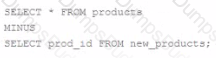
B)
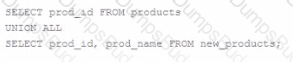
C)
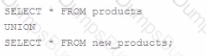
D)

E)

Options:
Option A
Option B
Option C
Option D
Option E
Answer:
A, DExplanation:
To determine which queries will execute successfully, we need to consider the compatibility of the column definitions and the structure of the SELECT statements:
Option A uses the MINUS set operator, which subtracts rows returned by the second SELECT statement from the rows returned by the first. For MINUS to work, the number and the order of columns and their data types must be the same in both queries. This query will not execute successfully because the second SELECT statement does not include all columns from the first SELECT statement, and the data types and sizes of PROD_ID do not match (CHAR(2) vs CHAR(4)).
Option B uses the UNION ALL set operator, which appends the results of the second SELECT statement to the results of the first. Unlike UNION, UNION ALL does not eliminate duplicate rows. This query will execute successfully because UNION ALL does not require the same data types or sizes, and the result will contain all columns from the first SELECT statement filled with NULL for non-matching columns from the second SELECT statement.
Option C uses the UNION set operator, which requires the same number of columns and compatible data types. This query will not execute successfully because PROD_NAME has different data types (CHAR(4) vs VARCHAR2(10)), and the result of a UNION must have the same number of columns with compatible data types in the two SELECT statements.
Option D uses the UNION set operator as well, but unlike Option C, it does not require a specific data type match because both SELECT statements include all columns and UNION is used (which will automatically handle type conversion where necessary). This query will execute successfully.
Option E uses the INTERSECT set operator, which requires the same number and order of columns and their data types to be identical or compatible. This query will not execute successfully because the data types and sizes of PROD_ID do not match (CHAR(2) vs CHAR(4)).
References:
Oracle Documentation on Set Operators: SQL Language Reference - Set Operators
Oracle Documentation on Data Type Precedence: SQL Language Reference - Data Type Precedence
In conclusion, only Option B and Option D will execute successfully because they adhere to the rules of the UNION ALL and UNION operators respectively, regarding column count and data type compatibility.
Which three are true?
Options:
LAST_DAY returns the date of the last day of the current ,month onlyu.
CEIL requires an argument which is a numeric data type.
ADD_MONTHS adds a number of calendar months to a date.
ADD_MONTHS works with a character string that can be implicitlyt converted to a DATE data type.
LAST_DAY return the date of the last day the previous month only.
CEIL returns the largest integer less than or equal to a specified number.
LAST_DAY returns the date of the last day of the month for the date argument passed to the function.
Answer:
C, D, GExplanation:
A: LAST_DAY does not only return the last day of the current month; it returns the last day of the month based on the date argument passed to it, which may not necessarily be the current month. Thus, statement A is incorrect.
B: CEIL requires a numeric argument and returns the smallest integer greater than or equal to that number. Thus, statement B is incorrect.
C: ADD_MONTHS function adds a specified number of calendar months to a date. This statement is correct as per the Oracle documentation.
D: ADD_MONTHS can work with a character string if the string can be implicitly converted to a DATE, according to Oracle SQL data type conversion rules. Therefore, statement D is correct.
E: LAST_DAY does not specifically return the last day of the previous month; it returns the last day of the month for any given date. Thus, statement E is incorrect.
F: CEIL returns the smallest integer greater than or equal to the specified number, not the largest integer less than or equal to it. Hence, statement F is incorrect.
G: LAST_DAY returns the last day of the month for the date argument passed to the function, which aligns with the definition in Oracle's SQL reference. Therefore, statement G is correct.
Which two statements are true about * _TABLES views?
Options:
You must have ANY TABLE system privileges, or be granted object privilges on the table, to viewa tabl e in DBA TABLES.
USER TABLES displays all tables owned by the current user.
You must have ANY TABLE system privileges, or be granted object privileges on the table, to view a table in USER_TABLES.
ALL TABLES displays all tables owned by the current user.
You must have ANY TABLE system privileges, or be granted object privileges on the table, to view a table in ALL_TABLES.
All users can query DBA_TABLES successfully.
Answer:
B, DExplanation:
In Oracle, *_TABLES views provide information about tables.
B. USER_TABLES displays all tables owned by the current user, making this statement true. No additional privileges are required to see your own tables.
D. ALL_TABLES displays all tables that the current user has access to, either through direct ownership or through privileges, making this statement true.
A, C, E, and F are incorrect. Specifically:
A and E are incorrect because you do not need ANY TABLE system privileges to view tables in DBA_TABLES or ALL_TABLES; you need the SELECT_CATALOG_ROLE or equivalent privileges.
C is incorrect because as a user, you do not need additional privileges to see your own tables in USER_TABLES.
F is incorrect because not all users can query DBA_TABLES; this requires specific privileges or roles.
References:
Oracle Database Reference, 12c Release 1 (12.1): "Static Data Dictionary Views"
Which three are true about granting object privileges on tables, views, and sequences?
Options:
UPDATE can be granted only on tables and views.
DELETE can be granted on tables, views, and sequences.
REFERENCES can be granted only on tables and views.
INSERT can be granted on tables, views, and sequences.
SELECT can be granted only on tables and views.
ALTER can be granted only on tables and sequences.
Answer:
C, E, FExplanation:
In Oracle Database, object privileges are rights to perform a particular action on a specific object in the database. Here's why the other options are incorrect:
A. UPDATE can be granted on tables, views, and materialized views, but not sequences. B. DELETE cannot be granted on sequences because sequences do not store data that can be deleted. D. INSERT cannot be granted on sequences; sequences are used to generate numbers, not to be inserted into directly. C. REFERENCES allows the grantee to create a foreign key that references the table or the columns of the table. It is applicable only to tables and views. E. SELECT can indeed only be granted on tables and views (including materialized views). F. ALTER is an object privilege that can be granted on tables and sequences but not views.
For more details, one may refer to the Oracle Database SQL Language Reference documentation, which specifies the types of object privileges and the objects they apply to.
Examine this query:
SELECT INTERVAL '100' MONTH DURATION FROM DUAL;
What will be the output?
Options:
DURATION
+08-04
DUFATION
+100
DURATION
+08
an error
Answer:
AExplanation:
When you use the INTERVAL literal for months, the result is displayed in years and months if the total number of months exceeds 12.
In the query given:
SELECT INTERVAL '100' MONTH DURATION FROM DUAL;
the output will display the interval of 100 months converted to years and the remaining months. 100 months is equal to 8 years and 4 months. Hence, the correct answer is:
DURATION +08-04
Which three statements are true about indexes and their administration in an Oracle database?
Options:
An INVISIBLE index is not maintained when Data Manipulation Language (DML) is performed on its underlying table.
An index can be created as part of a CREATE TABLE statement.
A DROP INDEX statement always prevents updates to the table during the drop operation
A UNIQUE and non-unique index can be created on the same table column
A descending index is a type of function-based index
If a query filters on an indexed column then it will always be used during execution of the query
Answer:
B, D, EExplanation:
A. This statement is incorrect. An INVISIBLE index is maintained during DML operations just like a VISIBLE index. The difference is that an INVISIBLE index is not used by the optimizer unless explicitly hinted. B. This statement is correct. When creating a table, you can define indexes on one or more columns as part of the table definition. C. This statement is incorrect. While a DROP INDEX statement will drop the index, it does not always prevent updates to the table. If the index is marked as unusable or is an invisible index, for example, updates can still be performed. D. This statement is correct. It is possible to have both a UNIQUE index and a non-unique index on the same column. The UNIQUE index enforces the uniqueness of column values, while the non-unique index does not. E. This statement is correct to some extent. Descending indexes are not function-based indexes per se, but they are indexes on which the data is sorted in descending order, as opposed to the default ascending order. However, descending indexes are conceptually related to function-based indexes because they alter the way the indexed data is stored. F. This statement is incorrect. The use of an index in query execution depends on the optimizer's decision, which is based on statistics and the cost associated with using the index. There are situations where the optimizer may choose a full table scan even if there is an index on the filter column.
References can be found in the Oracle Database Concepts Guide and the SQL Language Reference documentation, which detail the behavior of indexes and how they are managed within the Oracle database.
Examine the data in the CUST NAME column of the CUSTOMERS table:
CUST_NAME
------------------------------
Renske Ladwig
Jason Mallin
Samuel McCain
Allan MCEwen
Irene Mikkilineni
Julia Nayer
You want to display the CUST_NAME values where the last name starts with Mc or MC. Which two WHERE clauses give the required result?
Options:
WHERE INITCAP (SUBSTR(cust_name, INSTR(cust_name,'') +1)) IN ('MC%','Mc%)
WHERE UPPER (SUBSTR(cust_name, INSTR(cust_name, '') +1)) LIKE UPPER('MC%')
WHERE INITCAP(SUBSTR(cust_name, INSTR(cust_name,'') +1)) LIKE'Mc%'
WHERE SUBSTR(cust_name,INSTR(cust_name,'') +1) LIKE'Mc%' OR'MC%'
WHERE SUBSTR(cust_name, INSTR(cust_name,'') +1) LIKE'Mc%'
Answer:
B, CExplanation:
To find customers whose last names start with "Mc" or "MC", we need to ensure our SQL query correctly identifies and compares these prefixes regardless of case variations. Let's analyze the given options:
Option B: WHERE UPPER(SUBSTR(cust_name, INSTR(cust_name, ' ') + 1)) LIKE UPPER('MC%')This clause uses UPPER to convert both the extracted substring (starting just after the first space, assuming it indicates the start of the last name) and the comparison string 'MC%' to uppercase. This ensures case-insensitive comparison. The LIKE operator is used to match any last names starting with "MC", which will correctly capture both "Mc" and "MC". This option is correct.
Option C: WHERE INITCAP(SUBSTR(cust_name, INSTR(cust_name, ' ') + 1)) LIKE 'Mc%'This clause applies INITCAP to the substring, which capitalizes the first letter of each word and makes other letters lowercase. The result is compared to 'Mc%', assuming only the last name follows the space. This approach will match last names starting with "Mc" (like "McEwen"), but not "MC". However, considering we're looking for "Mc" specifically, this clause works under the assumption that "Mc" is treated as proper capitalization for these last names. Thus, it can also be considered correct, albeit less inclusive than option B.
The other options either use incorrect syntax or apply case-sensitive matches without ensuring that both "Mc" and "MC" are captured:
Option A: Contains syntax errors (unmatched quotes and wrong use of IN).
Option D: Uses case-sensitive match without combining both "Mc" and "MC".
Option E: Only matches "Mc", which is too specific.
Examine the description of the ORDERS table:
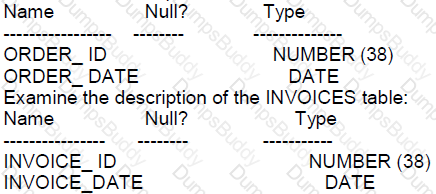
Which three statements execute successfully?
Options:
(SELECT * FROM orders
UNION ALL
SELECT* FROM invoices) ORDER BY order _id;
SELECE order _id, order _ date FRON orders
LNTERSECT
SELECT invoice_ id, invoice_ id, order_ date FROM orders
SELECT order_ id, invoice_ data order_ date FROM orders
MINUS
SELECT invoice_ id, invoice_ data FROM invoices ORDER BY invoice_ id;
SELECT * FROM orders ORDER BY order_ id
INTERSEOT
SELECT * FROM invoices ORDER BY invoice_ id;
SELECT order_ id, order_ data FROM orders
UNION ALL
SELECT invoice_ id, invoice_ data FROM invoices ORDER BY order_ id;
SELECT * FROM orders
MINUS
SELECT * FROM INVOICES ORDER BY 1
SELECT * FROM orders ORDER BY order_ id
UNION
SELECT * FROM invoices;
Answer:
A, E, GExplanation:
In Oracle SQL, set operations like UNION, UNION ALL, INTERSECT, and MINUS can be used to combine results from different queries:
Option A:
Combining results using UNION ALL followed by ORDER BY will execute successfully because UNION ALL allows duplicate rows and ORDER BY can be used to sort the combined result set.
Option E:
Similar to option A, UNION ALL combines all rows from the two selects and allows ordering of the results.
Option G:
UNION combines the results from two queries and removes duplicates, and ORDER BY can be used to sort the final result set.
Options B, C, D, and F are incorrect because:
Option B: You cannot intersect different columns (ORDER_ID with INVOICE_ID).
Option C: Incorrect column names and syntax with ORDER BY.
Option D: ORDER BY cannot be used before a set operator like INTERSECT.
Option F: ORDER BY cannot be used directly after a MINUS operator without wrapping the MINUS operation in a subquery.
Which two are true about queries using set operators such as UNION?
Options:
An expression in the first SELECT list must have a column alias for the expression
CHAR columns of different lengths used with a set operator retum a vAacsua mhtoe e equals the longest CHAR value.
Queries using set operators do not perform implicit conversion across data type groups (e.g. character, numeric)
In a query containing multiple set operators INTERSECT always takes precedence over UNION and UNION ALL
All set operators are valid on columns all data types.
Answer:
B, DExplanation:
Set operators allow you to combine multiple queries into a single query. The key points for each option are:
A. An expression in the first SELECT list does not need to have a column alias; however, the column alias given to an expression in the first SELECT list is used as the column name of the output.
B. This statement is true. When CHAR columns of different lengths are combined with a set operator, Oracle will pad the shorter values with spaces to match the length of the longest value. This behavior is consistent with the SQL standard and Oracle's treatment of the CHAR datatype.
C. Oracle Database performs implicit conversion between compatible data types where necessary when using set operators. For example, a NUMBER can be implicitly converted to a VARCHAR2 and vice versa if the context requires it.
D. This is true. When multiple set operators are used in a single query, the INTERSECT operator takes precedence over the UNION and UNION ALL operators. This order of operation can be overridden by using parentheses.
E. Not all set operators work with all data types. For instance, LOB and LONG RAW data types cannot be used with set operators.
References:
Oracle Database SQL Language Reference, 12c Release 1 (12.1): "Set Operators"
Oracle Database SQL Language Reference, 12c Release 1 (12.1): "Data Types"
Which three statements are true about Oracle synonyms?
Options:
A synonym cannot be created for a PL /SQL package.
A SEQUENCE can have a synonym.
A synonym can be available to all users .
A synonym created by one user can refer to an object belonging to another user.
Any user can drop a PUBLIC synonym.
Answer:
B, C, DExplanation:
B. True. In Oracle, synonyms can be created for sequences, allowing them to be referenced with an alternative name. This can be particularly useful when sequences are accessed across different schemas.
C. True. Oracle provides the ability to create public synonyms which are available to all users in the database. A public synonym is accessible to any user that has the necessary privileges on the underlying object.
D. True. A synonym can be created by a user to refer to an object owned by another user, assuming that the creator of the synonym has the necessary privileges to access the object owned by the other user.
Which three are true about subqueries?
Options:
A subquery can be used in a WHERE clause.
A subquery can be used in a HAVING clause.
=ANY can only evaluate the argument against a subcjuery if it returns two or more values.
A subquery cannot be used in a FROM clause.
< any returns true if the argument is less than the lowest value returned by the subquery.
A subquery cannot be used in the select list.
Answer:
A, B, DExplanation:
About the roles and behavior of subqueries in SQL:
A. A subquery can be used in a WHERE clause: Subqueries are often used in WHERE clauses to filter rows based on a condition evaluated against a set of returned values.
B. A subquery can be used in a HAVING clause: Similar to WHERE, subqueries can be used in HAVING clauses to filter groups based on aggregate conditions.
D. <ANY returns true if the argument is less than the highest value returned by the subquery: The
Incorrect options:
C: =ANY evaluates true if the argument matches any single value returned by the subquery, irrespective of the number of values.
E: A subquery can indeed be used in a FROM clause, known as a derived table or inline view.
F: G: A subquery can be used in a SELECT list, particularly when the subquery is designed to return a single value (scalar subquery).
Examine the description of the EMPLOYEES table:
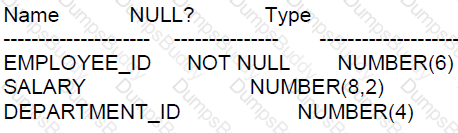
Which two queries return the highest salary in the table?
Options:
SELECT department_id, MAX(salary)
FROM employees
GROUP BY department_id;
SELECT MAX (salary)
FROM employees;
SELECT MAX (salary)
FROM employees
GROUP BY department_id;
SELECT MAX (salary)
FROM employees
GROUP BY department_id
HAVING MAX (salary) = MAX (MAX (salary));
SELECT MAX (MAX (salary))
FROM employees
GROUP BY department_id;
Answer:
BExplanation:
Query B will return the highest salary in the table without grouping by department. It simply selects the maximum value for the salary column across the entire table.
Query C and D are incorrect because the GROUP BY clause will return the highest salary for each department, not the single highest salary in the entire table.
Query E is incorrect because MAX(MAX(salary)) is not a valid use of aggregate functions and will result in an error.
References:
Oracle Documentation on Aggregate Functions: Aggregate Functions
Which two are true?
Options:
CONCAT joins two or more character strings together.
FLOOR returns the largest integer less than or equal to a specified number.
CONCAT joins two character strings together.
INSTR finds the offset within a string of a single character only.
INSTR finds the offset within a character string, starting from position 0.
FLOOR returns the largest positive integer less than or equal to a specified number.
Answer:
A, BExplanation:
The CONCAT function and FLOOR function in Oracle SQL have specific behaviors:
A. CONCAT function joins two or more character strings into one string, making this statement true.
B. FLOOR function returns the largest integer that is less than or equal to the specified number, making this statement true.
C. While CONCAT can join two strings together, this statement is incomplete as it can join more than two.
D. INSTR can find the offset of a substring within a string, not just a single character.
E. INSTR starts searching the string from position 1 in Oracle SQL, not position 0.
F. FLOOR does return the largest integer less than or equal to the specified number, but it can be any integer, not just positive ones.
References:
Oracle Database SQL Language Reference, 12c Release 1 (12.1): "Single-Row Functions"
You execute this command:
TRUNCATE TABLE depts;
Which two are true?
Options:
It retains the indexes defined on the table.
It drops any triggers defined on the table.
A Flashback TABLE statement can be used to retrieve the deleted data.
It retains the integrity constraints defined on the table.
A ROLLBACK statement can be used to retrieve the deleted data.
It always retains the space used by the removed rows
Answer:
A, DExplanation:
The TRUNCATE TABLE command in Oracle SQL is used to quickly delete all rows from a table:
Option A:
It retains the indexes defined on the table. TRUNCATE does not affect the structure of the table, including its indexes.
Option D:
It retains the integrity constraints defined on the table. TRUNCATE does not remove or disable integrity constraints, except for unenforced foreign keys.
Options B, C, E, and F are incorrect because:
Option B: TRUNCATE does not drop triggers; it only removes all rows.
Option C: Flashback Table cannot be used after a TRUNCATE because TRUNCATE is a DDL operation that does not generate undo data for flashback.
Option E: A ROLLBACK cannot be used after a TRUNCATE because TRUNCATE is a DDL command that implicitly commits.
Option F: TRUNCATE may deallocate the space used by the table, depending on the database version and specific options used with the TRUNCATE command.
You execute this command:
TRUNCATE TABLE dept;
Which two are true?
Options:
It drops any triggers defined on the table.
It retains the indexes defined on the table.
It retains the integrity constraints defined on the table.
A ROLLBACK statement can be used to retrieve the deleted data.
It always retains the space used by the removed rows.
A FLASHBACK TABLE statement can be used to retrieve the deleted data.
Answer:
B, CExplanation:
When using the TRUNCATE TABLE command in Oracle, several aspects of the table's structure and associated database objects are impacted. Here's an explanation of each option:
A: Incorrect. TRUNCATE TABLE does not drop triggers associated with the table; they remain defined.
B: Correct. Indexes on the table are retained and not dropped when you truncate a table. However, if the index is a domain index, it may be dropped depending on its type.
C: Correct. Integrity constraints such as primary keys, foreign keys, etc., are retained unless they are on a disabled state where truncation can lead to constraint being dropped.
D: Incorrect. A TRUNCATE TABLE operation cannot be rolled back. It is a DDL (Data Definition Language) operation and commits automatically.
E: Incorrect. The TRUNCATE TABLE operation deallocates the space used by the data unless the REUSE STORAGE clause is specified.
F: Incorrect. TRUNCATE TABLE operation removes all the rows in a table and does not log individual row deletions, thus FLASHBACK TABLE cannot be used to retrieve the data.
Examine the description of the countries table:
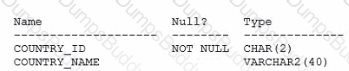
Examine the description of the departments table:

Examine the description of the locations table:

Which two queries will return a list of countries with no departments?
A)
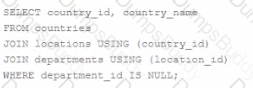
B)
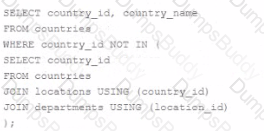
C)
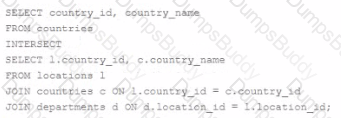
D)
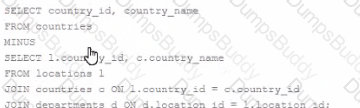
Options:
Option A
Option B
Option C
Option D
Answer:
B, DExplanation:
The query's goal is to return a list of countries that have no departments linked to them.
Option B and Option D are the correct answers because they use set operations that will effectively return countries that do not have a corresponding entry in the departments table:
Option B uses the NOT IN subquery to exclude countries that have departments linked to them. It looks for country_id values in the countries table that are not present in the list of country_id values associated with locations that are, in turn, associated with departments. This will correctly return countries that have no departments.
Option D uses the MINUS set operator, which subtracts the results of the second SELECT statement from the results of the first. This statement will return all countries from the countries table minus those that have an associated department_id in the departments table, effectively listing countries with no departments.
Option A and Option C are incorrect because:
Option A will not execute successfully as it tries to join tables using a column (country_id) that doesn't exist in the departments table, which will lead to an error.
Option C's use of INTERSECT is incorrect for this requirement. INTERSECT returns only the rows that exist in both queries. Since we want countries with no departments, using INTERSECT would actually return the opposite of what is required.
References:
Oracle Documentation on NOT IN clause: SQL Language Reference - Subquery
Oracle Documentation on MINUS operator: SQL Language Reference - Set Operators
Therefore, the correct options are B and D, which use subquery exclusion and the MINUS set operator, respectively, to accurately identify and return countries without departments.
Examine the description of the MEMBERS table;
SELECT city,last_name LNAME FROM members …
You want to display all cities that contain the string AN. The cities must be returned in ascending order, with the last names further sorted in descending order.
Which two clauses must you add to the query?
Options:
ORDER BY 1,2.
ORDER BY last_name DESC,city ASC
CORADER BY 1, LNAME DESC
WHERE city=’%AN%;
WHERE city LIKE ’%AN%;
WHERE city IN (’%AN%’)
Answer:
C, EExplanation:
To achieve the desired output for the query from the MEMBERS table:
C. ORDER BY 1, LNAME DESC: This clause correctly sorts the results first by the first column (city) in ascending order by default, and then by the alias LNAME (last_name) in descending order.
E. WHERE city LIKE '%AN%': This clause correctly filters the rows to include only those cities containing the string 'AN' anywhere in the city name, using the LIKE operator which is suitable for pattern matching.
Incorrect options:
A: This would order both columns in ascending order, which does not meet the requirement for last_name to be in descending order.
B: This misplaces the order priorities and uses explicit column names that contradict the sorting requirement specified.
D: Incorrect syntax for a LIKE clause; equality operator cannot be used with wildcards.
F: The IN operator is incorrectly used here with a pattern, which is not valid syntax.
Examine the command to create the BOOKS table.
SQL> create table books(book id CHAR(6) PRIMARY KEY,
title VARCHAR2(100) NOT NULL,
publisher_id VARCHAR2(4),
author_id VARCHAR2 (50));
The BOOK ID value 101 does not exist in the table.
Examine the SQL statement.
insert into books (book id title, author_id values
(‘101’,’LEARNING SQL’,’Tim Jones’)
Options:
It executes successfully and the row is inserted with a null PLBLISHER_ID.
It executes successfully only if NULL is explicitly specified in the INSERT statement.
It executes successfully only NULL PUBLISHER_ID column name is added to the columns list in the INSERT statement.
It executes successfully onlyif NULL PUBLISHER ID column name is added to the columns list and NULL is explicitly specified In the INSERT statement.
Answer:
AExplanation:
A. It executes successfully and the row is inserted with a null PUBLISHER_ID: The SQL statement does not specify the publisher_id, and since there is no NOT NULL constraint on this column, Oracle will insert the row with a NULL value for publisher_id. The statement is syntactically correct, assuming the column names and values are properly specified and formatted.
In which three situations does a new transaction always start?
Options:
When issuing a SELECT FOR UPDATE statement after a CREATE TABLE AS SELECT statement was issued in the same session
When issuing a CREATE INDEX statement after a CREATE TABLE statement completed unsuccessfully in the same session
When issuing a TRUNCATE statement after a SELECT statement was issued in the same session
When issuing a CREATE TABLE statement after a SELECT statement was issued in the same session
When issuing the first Data Manipulation Language (OML) statement after a COMMIT or ROLLBACK statement was issued in the same session
When issuing a DML statement after a DML statement filed in the same session.
Answer:
A, C, EExplanation:
Substitution variables in Oracle are used to replace a value dynamically during the execution of SQL statements. The behavior of these variables is well-documented:
C. A substitution variable prefixed with & always prompts only once for a value in a session: This is true. In a session, when you use a single ampersand (&), SQL*Plus or SQL Developer will prompt for the value the first time the variable is encountered. The value for this variable will then be reused for the remainder of the session unless it is redefined.
D. A substitution variable can be used with any clause in a SELECT statement: Substitution variables can be placed in any part of a SQL statement, including the SELECT, WHERE, GROUP BY, ORDER BY, etc. They are not limited to any specific clause.
References:
Oracle SQL*Plus User's Guide and Reference, which discusses substitution variables.
Which two statements cause changes to the data dictionary?
Options:
DELETE FROM scott. emp;
GRANT UPDATE ON scott. emp TO fin manager;
AITER SESSION set NLs. _DATE FORMAT = 'DD/MM/YYYY';
TRUNCATE TABLE emp:
SELECT * FROM user_ tab._ privs;
Answer:
B, DExplanation:
The data dictionary is a read-only set of tables that provides information about the database. Certain operations that modify the database structure will cause changes to the data dictionary:
Option B: GRANT UPDATE ON scott.emp TO fin_manager;
Granting privileges on a table will change the data dictionary as it records the new privilege.
Option D: TRUNCATE TABLE emp;
Truncating a table affects the data dictionary because it removes all rows from a table and may also reset storage parameters.
Options A, C, and E do not cause changes to the data dictionary:
Option A is incorrect because the DELETE command modifies data, not the data dictionary structure.
Option C is incorrect because altering a session parameter does not change the data dictionary; it is a temporary change for the session.
Option E is incorrect because a SELECT query does not change the database, it just retrieves information.
Which two are true about transactions in the Oracle Database?
Options:
A session can see uncommitted updates made by the same user in a different session.
A DDL statement issued by a session with an uncommitted transaction automatically Commits that transaction.
DML statements always start new transactions.
DDL statements automatically commit only data dictionary updates caused by executing the DDL.
An uncommitted transaction is automatically committed when the user exits SQL*Plus.
Answer:
B, EExplanation:
This question appears to be a duplicate of question no. 269, and the correct answers provided there apply here as well.
B. True. A DDL statement automatically commits any outstanding uncommitted transaction in the session. E. True. Exiting SQL*Plus without explicitly committing a transaction will cause the uncommitted transaction to be rolled back, not committed.
A, C, and D are incorrect for the same reasons provided in the explanation for question no. 269.
Which three statements are true about Data Manipulation Language (DML)?
Options:
delete statements can remove multiple rows based on multiple conditions.
insert statements can insert nulls explicitly into a column.
insert into. . .select. . .from statements automatically commit.
DML statements require a primary key be defined on a table.
update statements can have different subqueries to specify the values for each updated column.
Answer:
A, B, EExplanation:
Data Manipulation Language (DML) operations in Oracle 12c are critical for handling data within tables. Here’s the validity of each statement based on Oracle SQL documentation:
Option A: True. The DELETE statement can remove multiple rows from a table and supports the use of multiple conditions in the WHERE clause to specify which rows should be removed. This allows for flexibility in managing data deletion based on various criteria.
Option B: True. The INSERT statement can explicitly insert NULL values into a column, assuming there are no constraints (like NOT NULL) preventing such entries. This is useful for representing the absence of data or when data is unknown.
Option C: False. DML statements like INSERT INTO...SELECT...FROM do not automatically commit in Oracle. Transactions in Oracle require explicit COMMIT commands to finalize changes, unless in an autocommit mode set by a client tool or environment, which is generally not the default behavior for server-side operations.
Option D: False. DML statements do not require a primary key to be defined on a table. While having a primary key is a best practice for identifying each row uniquely, it's not a prerequisite for performing DML operations like INSERT, UPDATE, or DELETE.
Option E: True. The UPDATE statement can include different subqueries within the SET clause to determine the values for each column being updated. This allows for complex calculations and data retrieval to be part of an update, increasing the power and flexibility of data modification.
Examine this partial statement:
SELECT ename, sal,comm FROM emp
Now examine this output:
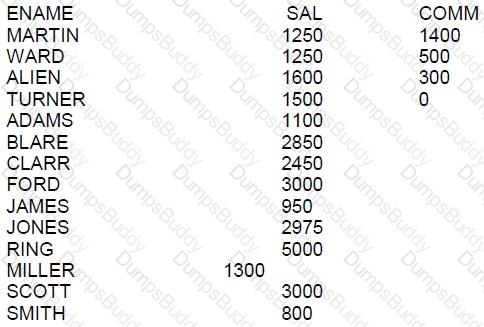
WHICH ORDER BY clause will generate the displayed output?
Options:
ORDER BY NVL(enam,0) DESC, ename
ORDER BY NVL(comm,0) ASC NULLS FIRST, ename
ORDER BY NVL(comm,0) ASC NULLS LAST, ename
ORDER BY comm DESC NULLS LAST, ename
Answer:
BExplanation:
The ORDER BY clause is used in a SELECT statement to sort the returned rows by one or more columns.
A. This clause would attempt to order by ename as if it were a numeric column, which is not correct since ename is not numeric.
B. This is the correct answer. The NVL function replaces nulls with the specified value, in this case, 0. This clause sorts by comm, with nulls considered as 0 and appearing first, followed by the actual values, and then sorts by ename.
C. This clause is incorrect because it would place null values at the end, but in the output, rows with null comm appear at the beginning.
D. This clause would sort the comm in descending order with the nulls at the end, which is not consistent with the output shown.
References:
Oracle Database SQL Language Reference, 12c Release 1 (12.1): "ORDER BY Clause"
Oracle Database SQL Language Reference, 12c Release 1 (12.1): "NVL Function"
Please note that the correct formatting of SQL statements and clauses is crucial for the successful execution of queries.
Which three statements are true about Structured Query Language (SQL)?
Options:
It guarantees atomicity, consistency, isolation, and durability (ACID) features
It best supports relational databases
It is used to define encapsulation and polymorphism for a relational table
It requires that data be contained in hierarchical data storage
It is the only language that can be used for both relational and object-oriented databases
It provides independence for logical data structures being manipulated from the underlying physical data storage
Answer:
B, FExplanation:
For question 134, the correct options are B and F based on the capabilities and design of SQL:
B. It best supports relational databases: SQL is fundamentally designed to manage and query data in relational databases. It is the standard language used for managing relational database management systems (RDBMS) and for performing all types of data operations within them.
F. It provides independence for logical data structures being manipulated from the underlying physical data storage: SQL allows users to interact with the data at a logical level without needing to know how the data is physically stored. This is known as logical data independence, which is a key feature of SQL in managing databases.
Other options are incorrect because:
A: SQL itself doesn't guarantee ACID properties; these are provided by the database management system's transaction control mechanisms.
C, D, E: These statements are incorrect as SQL does not inherently support object-oriented concepts like encapsulation and polymorphism, is not limited to hierarchical data storage, and is not the only language used for both relational and object-oriented databases.
Examine this partial command:
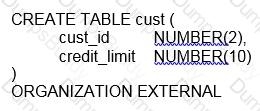
Which two clauses are required for this command to execute successfully?
Options:
the DEFAULT DIRECTORY clause
the REJECT LIMIT clause
the LOCATION clause
the ACCESS PARAMETERS clause
the access driver TYPE clause
Answer:
C, EExplanation:
In Oracle Database 12c, when creating an external table using the CREATE TABLE ... ORGANIZATION EXTERNAL statement, there are certain clauses that are mandatory for the command to execute successfully.
Statement C, the LOCATION clause, is required. The LOCATION clause specifies one or more external data source locations, typically a file or a directory that the external table will read from. Without this, Oracle would not know where to find the external data for the table.
Statement E, the access driver TYPE clause, is also required. The access driver tells Oracle how to interpret the format of the data files. The most common access driver is ORACLE_LOADER, which allows the reading of data files in a format compatible with the SQL*Loader utility. Another option could be ORACLE_DATAPUMP, which reads data in a Data Pump format.
Statements A, B, and D are not strictly required for the command to execute successfully, although they are often used in practice:
A, the DEFAULT DIRECTORY clause, is not mandatory if you have specified the full path in the LOCATION clause, but it is a best practice to use it to avoid hard-coding directory paths in the LOCATION clause.
B, the REJECT LIMIT clause, is optional and specifies the maximum number of errors to allow during the loading of data. If not specified, the default is 0, meaning the load will fail upon the first error encountered.
D, the ACCESS PARAMETERS clause, is where one would specify parameters for the access driver, such as field delimiters and record formatting details. While it is common to include this clause to define the format of the external data, it is not absolutely required for the command to execute; defaults would be used if this clause is omitted.
For reference, you can find more details in the Oracle Database SQL Language Reference for version 12c, under the CREATE TABLE statement for external tables.
Which two are true about the MERGE statement?
Options:
The WHEN NOT MATCHED clause can be used to specify the deletions to be performed.
The WHEN NOT MATCHED clause can be used to specify the inserts to be performed.
The WHEN MATCHED clause can be used to specify the inserts to be performed.
The WHEN NOT MATCHED clause can be used to specify the updates to be performed.
The WHEN MATCHED clause can be used to specify the updates to be performed.
Answer:
B, EExplanation:
The correct answers regarding the MERGE statement are:
B. The WHEN NOT MATCHED clause can be used to specify the inserts to be performed. This is true. When a row from the source does not match any row in the target, the WHEN NOT MATCHED clause is where you specify the insert operation.
E. The WHEN MATCHED clause can be used to specify the updates to be performed. This is true as well. The WHEN MATCHED clause is where you specify the update (or delete) operation to be performed when the source and target rows match.
Options A, C, and D are incorrect:
A is incorrect because WHEN NOT MATCHED does not handle deletions, it is for inserts.
C is incorrect as inserts are not specified in the WHEN MATCHED clause but in the WHEN NOT MATCHED clause.
D is incorrect because updates are specified in the WHEN MATCHED clause, not the WHEN NOT MATCHED clause.
Which statement is true about aggregate functions?
Options:
The AVG function implicitly converts NULLS to zero
The MAX and MIN functions can be used on columns with character data types
Aggregate functions can be used in any clause of a SELECT statement
Aggregate functions can be nested to any number of levels
Answer:
BExplanation:
B: True. The MAX and MIN functions can be applied to columns with character data types. These functions will return the highest or lowest values in a set of rows, based on alphabetical order for character data. This allows these aggregate functions to be versatile and useful across different data types, including numerical, date, and character types.
Which three statements about roles are true?
Options:
Roles are assigned to roles using the ALTER ROLE Statement
A role is a named group of related privileges that can only be assigned to a user
Roles are assigned to users using the ALTER USER statement
A single role can be assigned to multiple users.
A single user can be assigned multiple roles
Privileges are assigned to a role using the ALTER ROLE statement.
Privileges are assigned to a role using the GRANT statement.
Answer:
D, E, GExplanation:
Roles are named collections of privileges in Oracle databases.
A. False. Roles cannot be assigned to other roles using the ALTER ROLE statement.
B. False. Roles can be assigned to both users and other roles.
C. True. Roles are assigned to users using the ALTER USER statement, but this is not the only method.
D. True. A single role can be assigned to multiple users, simplifying the management of user privileges.
E. True. A single user can be assigned multiple roles.
F. False. Privileges are not assigned to a role using the ALTER ROLE statement.
G. True. Privileges are assigned to a role using the GRANT statement.
Which two are true about creating tables in an Oracle database?
Options:
A create table statement can specify the maximum number of rows the table will contain.
The same table name can be used for tables in different schemas.
A system privilege is required.
Creating an external table will automatically create a file using the specified directory and file name.
A primary key constraint is manadatory.
Answer:
B, CExplanation:
Regarding creating tables in an Oracle database:
B. The same table name can be used for tables in different schemas: In Oracle, a schema is essentially a namespace within the database; thus, the same table name can exist in different schemas without conflict, as each schema is distinct.
C. A system privilege is required: To create tables, a user must have the necessary system privileges, typically granted explicitly or through roles such as CREATE TABLE or administrative privileges depending on the environment setup.
Incorrect options for all three repeated questions:
A: Oracle SQL does not allow specifying the maximum number of rows directly in a CREATE TABLE statement; this is controlled by storage allocation and database design rather than table creation syntax.
D: Creating an external table does not create the physical file. It merely creates a table structure that allows access to data stored in an external file specified in the directory; the file itself must already exist or be managed outside of Oracle.
E: A primary key constraint is not mandatory for creating tables. While it is a common practice to define a primary key to enforce entity integrity, it is not required by the Oracle SQL syntax for table creation.
These answers and explanations are aligned with Oracle Database 12c SQL documentation and standard practices.
Which two statements are true about substitution variables?
Options:
A substitution variable used to prompt for a column name must be endorsed in single quotation marks.
A substitution variable used to prompt for a column name must be endorsed in double quotation marks.
A substitution variable prefixed with & always prompts only once for a value in a session.
A substitution variable can be used with any clause in a SELECT statement.
A substitution variable can be used only in a SELECT statement.
A substitution variable prefixed with 6 prompts only once for a value in a session unless is set to undefined in the session.
Answer:
C, DExplanation:
Substitution variables in Oracle are used to replace a value dynamically during the execution of SQL statements. The behavior of these variables is well-documented:
C. A substitution variable prefixed with & always prompts only once for a value in a session: This is true. In a session, when you use a single ampersand (&), SQL*Plus or SQL Developer will prompt for the value the first time the variable is encountered. The value for this variable will then be reused for the remainder of the session unless it is redefined.
D. A substitution variable can be used with any clause in a SELECT statement: Substitution variables can be placed in any part of a SQL statement, including the SELECT, WHERE, GROUP BY, ORDER BY, etc. They are not limited to any specific clause.
References:
Oracle SQL*Plus User's Guide and Reference, which discusses substitution variables.
Examine the description of the PRODUCTS table:
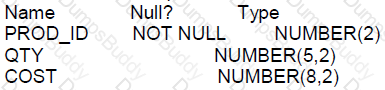
Which two statements execute without errors?
Options:
MERGE INTO new_prices n
USING (SELECT * FROM products) p
WHEN MATCHED THEN
UPDATE SET n.price= p.cost* 01
WHEN NOT MATCHED THEN
INSERT(n.prod_id, n.price) VALUES(p.prod_id, cost*.01)
WHERE(p.cost<200);
MERGE INTO new_prices n
USING (SELECT * FROM products WHERE cost>150) p
ON (n.prod_id= p.prod_id)
WHEN MATCHED THEN
UPDATE SET n.price= p.cost*.01
DELETE WHERE (p.cost<200);
MERGE INTO new_prices n
USING products p
ON (p.prod_id =n.prod_id)
WHEN NOT MATCHED THEN
INSERT (n.prod _id, n.price) VALUES (p.prod_id, cost*.01)
WHERE (p.cost<200);
MERGE INTO new_prices n
USING (SELECT * FROM products WHERE cost>150) p
ON (n.prod_id= p.prod_id)
WHEN MATCHED THEN
DELETE WHERE (p.cost<200)
Answer:
BExplanation:
B: True. This MERGE statement should execute without errors. It uses a conditionally filtered selection from the products table as a source to update or delete rows in the new_prices table based on whether the prod_id matches and the cost is greater than 150. The delete operation within a MERGE statement is allowed in Oracle when a WHEN MATCHED clause is specified.
The MERGE statement is correctly structured with a USING clause that includes a subquery with a valid WHERE condition, an ON condition that specifies how to match rows between the source and the target, and a WHEN MATCHED THEN clause that specifies the update and delete operations based on the cost condition.
References:Oracle SQL documentation specifies that within a MERGE statement, you can specify a WHEN MATCHED clause to update and/or delete rows in the target table based on the condition specified after the DELETE keyword.
The ORDERS table has a primary key constraint on the ORDER_ID column.
The ORDER_ITEMS table has a foreign key constraint on the ORDER_ID column, referencing the primary key of the ORDERS table.
The constraint is defined with on DELETE CASCADE.
There are rows in the ORDERS table with an ORDER_TOTAL less than 1000.
Which three DELETE statements execute successfully?
Options:
DELETE FROM orders WHERE order_total<1000;
DELETE * FROM orders WHERE order_total<1000;
DELETE orders WHERE order_total<1000;
DELETE FROM orders;
DELETE order_id FROM orders WHERE order_total<1000;
Answer:
A, C, DExplanation:
In Oracle 12c SQL, the DELETE statement is used to remove rows from a table based on a condition. Given the constraints and the information provided, let's evaluate the options:
A. DELETE FROM orders WHERE order_total<1000;: This statement is correctly formatted and will delete rows from the ORDERS table where ORDER_TOTAL is less than 1000. If there is a DELETE CASCADE constraint, corresponding rows in the ORDER_ITEMS table will also be deleted.
B. DELETE * FROM orders WHERE order_total<1000;: This syntax is incorrect. The asterisk (*) is not used in the DELETE statement.
C. DELETE orders WHERE order_total<1000;: This statement is also correctly formatted and is a shorthand version of the DELETE statement without the FROM clause.
D. DELETE FROM orders;: This statement will delete all rows from the ORDERS table, and with DELETE CASCADE, it will also delete all related rows in the ORDER_ITEMS table.
E. DELETE order_id FROM orders WHERE order_total<1000;: This syntax is incorrect because you cannot specify a column after the DELETE keyword.
References:
Oracle Database SQL Language Reference 12c Release 1 (12.1), DELETE Statement
Whith three statements are true about built in data types?
Options:
A VARCHAR2 blank pads column values only if the data stored is non numeric and contains no special characlers
A BFILE stores unstructured binary data in operating systerm files
A CHAR column definition does not require the length to be specified
The default length for a CHAR column is always one character
A VARCHAR2 column definition does not require the length to be specified
A BLOB stores unstructured binary data within the database
Answer:
B, D, FExplanation:
The true statements about built-in data types in Oracle are:
B: A BFILE is a data type in Oracle that allows for a read-only link to binary files stored outside the database in the operating system. This is correct as per Oracle's documentation.
D: The default length for a CHAR column, when not specified, is one character. This is according to the Oracle SQL standard.
F: A BLOB is used for storing binary data within the Oracle database, allowing for storage of large amounts of unstructured binary data.
The incorrect options are:
A: A VARCHAR2 column does not blank-pad values; it is CHAR that may blank-pad to the fixed length.
C: A CHAR column requires a length specification, although if omitted, the default is one character.
E: A VARCHAR2 column requires a length specification; without it, the statement will fail.
References:
Oracle Documentation on Data Types: Data Types
Oracle Documentation on LOBs: LOBs
Oracle Documentation on Character Data Types: Character Data Types
Which two are true about granting object privileges on tables, views, and sequences?
Options:
DELETE can be granted on tables, views, and sequences.
REFERENCES can be grantrd only on tables.
INSERT can be granted only on tables and sequences.
SELECT can be granted on tables, views, and sequences.
ALTER can be granted only on tables and sequences.
Answer:
B, DExplanation:
Object privileges applicable to tables, views, and sequences in Oracle are:
B. REFERENCES can be granted only on tables. It allows the grantee to create a foreign key that refers to the table.
D. SELECT can be granted on tables and views. This allows the grantee to perform a SELECT on the table or view.
A, C, and E are incorrect. Specifically:
A is incorrect because DELETE cannot be granted on sequences; it is a privilege applicable to tables and views.
C is incorrect because INSERT cannot be granted on sequences; INSERT is applicable only to tables and views.
E is incorrect because ALTER is a privilege applicable to tables and indexes, not sequences.
References:
Oracle Database SQL Language Reference, 12c Release 1 (12.1): "GRANT"
Which is the default column or columns for sorting output from compound queries using SET operators such as INTERSECT in a SQL statement?
Options:
The first column in the last SELECT of the compound query
The first NUMBER column in the first SELECT of the compound query
The first VARCHAR2 column in the first SELECT of the compound query
The first column in the first SELECT of the compound query
The first NUMBER or VARCHAR2 column in the last SELECTof the compound query
Answer:
DExplanation:
For the sorting of output in compound queries (INTERSECT, UNION, etc.):
D. The first column in the first SELECT of the compound query: By default, Oracle does not automatically sort the results of SET operations unless an ORDER BY clause is explicitly stated. However, if an ORDER BY is implied or specified without explicit columns, the default sorting would logically involve the first column specified in the first SELECT statement of the compound query.
PDF + Testing Engine

Testing Engine
PDF (Q&A)